Participant
August 21, 2017
Answered

Table strokes

  • August 21, 2017
  • 1 reply
  • 1625 views

Hello,

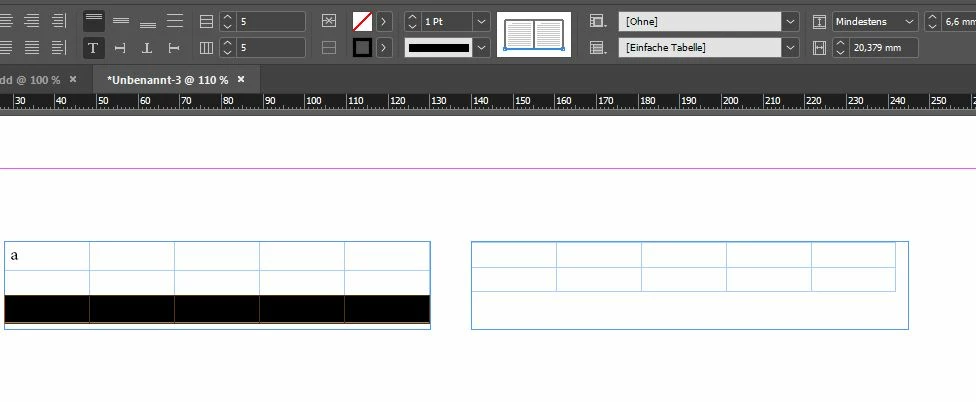
i have this problem: (i'm using latest indesign CC version)

as soon as i link the text(table-)fields and set the stroke of the last cell to black or whatever, the next (first) cell gets a stroke, too. do you know how i get rid of that first stroke? thanks!

this screenshots will help i think

    This topic has been closed for replies.
    Correct answer Jongware

    That is how tables work in InDesign. A row cannot have a stroke below without the next row having that exact same stroke at the top. It's not two different strokes, it is the same.

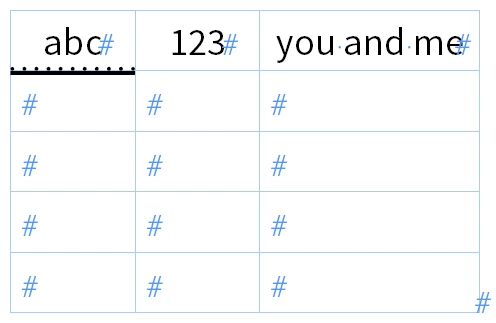
    If they were different, you'd be able to pull this off in an un-splitted row as well! I.e. a row with a 'dotted' stroke at the bottom and the one below it with a 'solid' stroke at the top:

    which is not possible with the standard controls.

    1 reply

    Jongware
    Community Expert
    JongwareCommunity ExpertCorrect answer
    Community Expert
    August 21, 2017

    That is how tables work in InDesign. A row cannot have a stroke below without the next row having that exact same stroke at the top. It's not two different strokes, it is the same.

    If they were different, you'd be able to pull this off in an un-splitted row as well! I.e. a row with a 'dotted' stroke at the bottom and the one below it with a 'solid' stroke at the top:

    which is not possible with the standard controls.

    unyqAuthor
    Participant
    August 21, 2017

    Hm, i was afraid of that answer. i found - working for me - a little workaround: i just inserted a small cell (1,1 high) without any strokes, so it is not visible an the next cells.

    Jongware
    Community Expert
    Community Expert
    August 21, 2017

    Yeah, that's a good manual fix. Done that myself in similar situations (a "footer line" at the bottom of continued tables); the one thing that bugs me is that it's not possible to go below that hardcoded 3pt limit ...