
Participant
January 22, 2024
Question

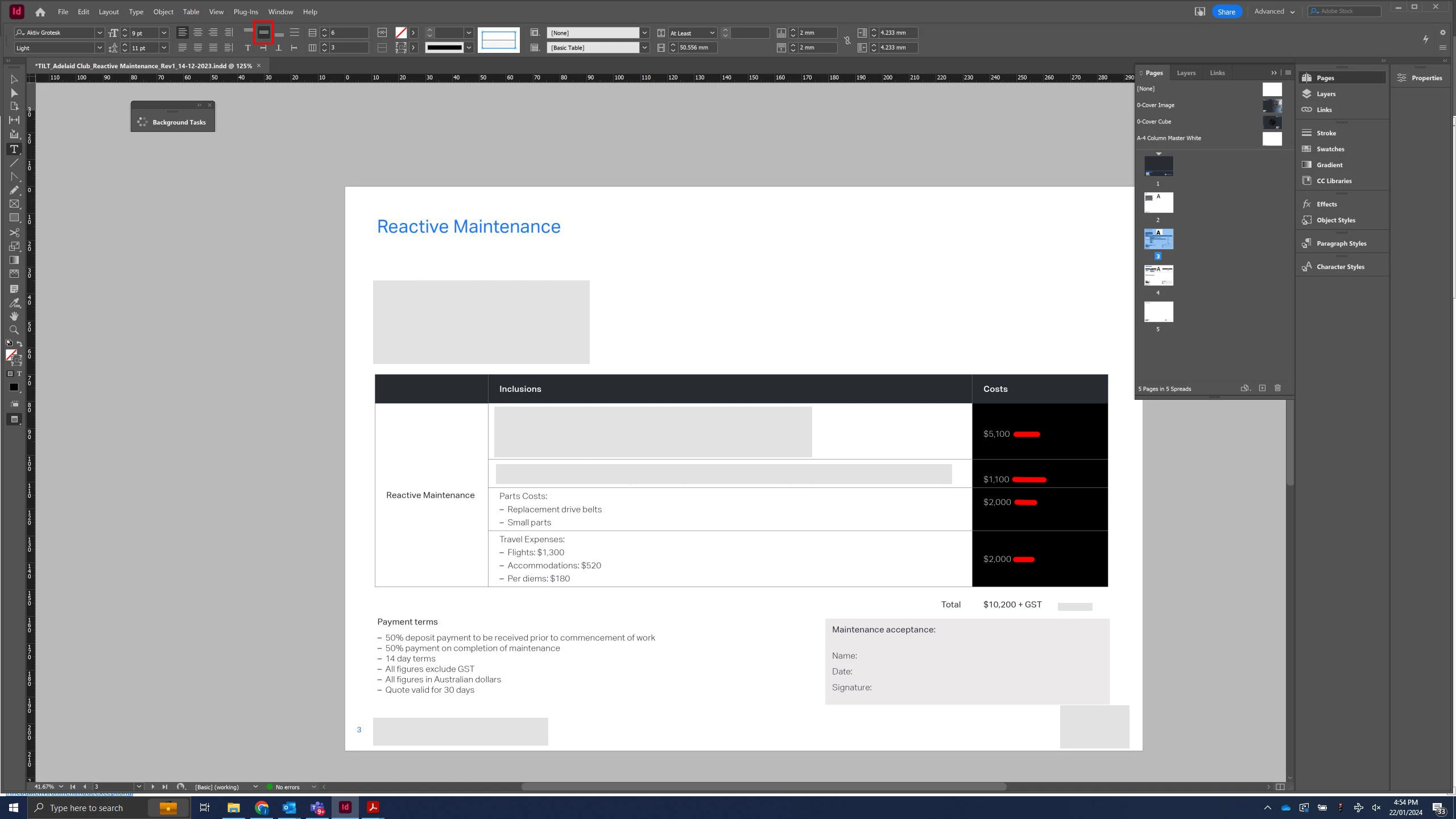
Table text alignment not working

  • January 22, 2024
  • 1 reply
  • 168 views

Hi all,


I have a simple table in an ID template and I find the align text feature does not function. If I change the horizontal alignment settings it makes no change to certain cells. Furthermore, multiple cells with apparently the same settings have varying alignments. See the attached screenshot with red highlights; note there are no line breaks or other hidden text features in the table that I can see.  Let me know your suggestions
This topic has been closed for replies.

1 reply

Community Expert
January 22, 2024

Try selecting all cells and Unmerge them - then redo the merging to the places that you need. 


https://helpx.adobe.com/ie/indesign/using/formatting-tables.html#:~:text=Table%C2%A0%3E%20Merge%20Cells.-,Unmerge%20cells,-Place%20the%20insertion


What's happening I think is -

InDesign doesn't truly merge cells - the cells are just 'hidden'

So when there's a conflict in the table things can start looking 'wonky'. 

It's best to reset back to base and redo the table cell merges to ensure the conflict is handled correctly.

Best I can explain it.