Participant
October 19, 2023
Question

Table with cell borders with no stroke creating slight discrepancies in some cases

  • October 19, 2023
  • 1 reply
  • 127 views

Trying to make some timetables but I've set all borders to stroke 0 width and getting some cases where a line border still appears, 
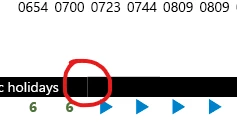
pdf view:


Seems like these couple cells are still a bit thicker than the rest somehow.
Some help please. 


This topic has been closed for replies.

1 reply

James Gifford—NitroPress
Legend
October 19, 2023

Strokes and fills are defined at two levels: the Table (style) and the Cell Style. Generally, Cell styles override Table styles, but not always.


Be sure to go into the Table style and zero out all fills and strokes, especially the 'Table Border' ones, then use organized Cell styles to paint and pattern your table. That should produce better consistency.

Participant
October 20, 2023

Ok thanks, think I figured it out. Was a problem with fills I think, my mix and matching Paper colour and None. I now made it all Paper colour then recolour the black to paper and black again and seems to have fixed it.

James Gifford—NitroPress
Legend
October 20, 2023

Ah, that, too. It's easy to "forget" about Paper color. Best not to use it, but create a White swatch instead. Glad you found it. Tables can be a pain when you get fancy with them.