
Participant
August 24, 2025
Answered

Tables: Cell styles missing option to "Start row on.."

  • August 24, 2025
  • 1 reply
  • 190 views
  • If I look at the "Cell Options" - I have Text, Graphic, Strokes-and-Fills, Rows-and-Columns, and Diagonal-Lines.
  • If I look at the options for "Cell Styles" - I have Text, Graphic, Strokes-and-Fills, and Diagonal-Lines.
  • Why can't I put the specifications under Rows-and-Columns into a Cell Style?


The furthest down I can get with Keyboard Shortcuts is Rows-and-Columns. I cannot apply a keyboard shortcut to a specific element inside that menu.


Is there any way to EASILY apply "start row on next odd page" to a whole bunch of different cells/rows? Can I add this to a Cell Style somehow, that I am missing?
Correct answer Peter Kahrel

Correct: cell styles lack the keep option, which is a great omission. Join the crowds at https://indesign.uservoice.com and vote for the user request.


> I cannot apply a keyboard shortcut to a specific element inside that menu.


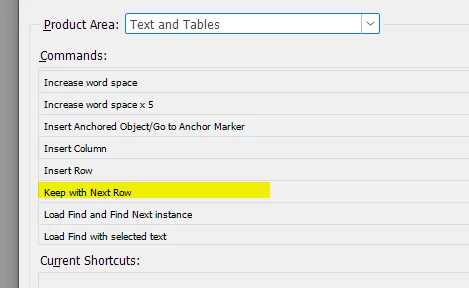
Wrong: in the keyboard editor, go to the Text and Tables area, you'll find Keep with next row there:


1 reply

Peter Kahrel
Community Expert
Peter KahrelCommunity ExpertCorrect answer
Community Expert
August 24, 2025

Correct: cell styles lack the keep option, which is a great omission. Join the crowds at https://indesign.uservoice.com and vote for the user request.


> I cannot apply a keyboard shortcut to a specific element inside that menu.


Wrong: in the keyboard editor, go to the Text and Tables area, you'll find Keep with next row there:


Community Expert
August 25, 2025

I use the Quick Apply

CMD+Enter


Then type in Keep With Next Row