
Participant
February 4, 2020
Question

Tables in Indesign: Dots don't align properly

  • February 4, 2020
  • 2 replies
  • 294 views

Hi there,


I have an issue that's driving me a little bonkers.

When I create a table in indesign and try to adjust the borders to "japanese dots" or just the regular dots, it stacks them weirdly at the cross-sections like so.
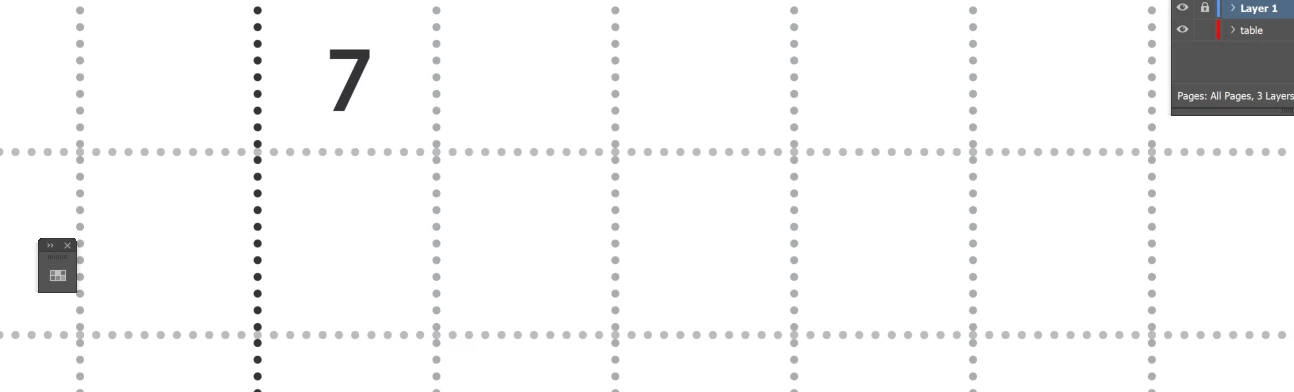


Is there any work-arounds for this? why is this happening?


the issue remains when I export this file to a PDF, and print it.


Thanks in advance.


This topic has been closed for replies.

2 replies

Barb Binder
Community Expert
Community Expert
February 4, 2020

Hi Maela:


Are  you defining the dots in at the table level or the cell level? Table Options (table level) makes you pick the line weight four times—if one number is different, I get the same result as you. When all four line weights are the same (in my case 8 pt) they line up correctly. 


~Barb


~Barb at Rocky Mountain Training
Community Expert
February 4, 2020

Hi Maela,

Japanese dots should work as expected.

From my German InDesign 2020 on Windows 10 where I am using Japanese Dots for table cell strokes:


What's your exact version of InDesign on what operating system?


Regards,
Uwe Laubender

( ACP )