I used my report text as the base Paragraph Style. Is that the/a problem?
Also, I found that the Tax Name at the top had the Description Header character style applied to it. Are my import options set correctly? Anything there to fix?
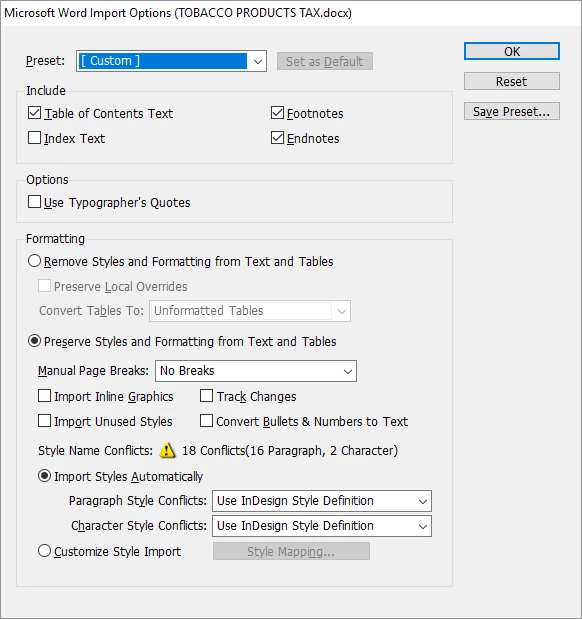
I've got to leave & likely won't get back at this until next week. Thanks for hanging in there with me! I think I've some something to mess up what was working properly & I need to figure out how to return to where I was...
I used to do a lot of book work some years back, but I haven't done any in a while, so I'm a little rusty. You don't have to do what I used to do (and many would say not to), but I used to get so many problems importing Word styles, I would just import as plain text and apply my styles in InDesign. That will take more time, and if you have to re-import from Word again (like if you have edits sent to you in Word), you will have to do the formatting again. The reason I did it was all of the junky stuff from many of the Word files I've been given. Many were done in what I call "Typewriter Style." That means that hanging indents were done with a paragraph return at the end of every line, followed by several tabs and then the second line of the paragraph, and so on. Basically faking it. Lots of double paragraph returns instead of space after, two spaces after a period, multiple tabs where one would do, etc. That would all have to be fixed with Find/Replace, but importing plain text also removes Local Overrides.
One thing that is probably getting in your way is what's called Local Formatting in some circles, and Local Overrides in InDesign. It's basically changing the formatting to the text directly, as opposed to defining it in the paragraph style. If you select some text and look at the paragraph style pallet, you will see a + next to the name if that selected portion of the text has local overrides on it. You get that sometimes when bolds, italics or other treatments are done locally, instead of via character styles (which won't show a + if they are done without their own local overrides). You can clear local overrides by selecting some text and going to the fly-out of the paragraph styles pallet and selecting Clear Overrides. The shortcut is to hold Option (Mac OS) or Alt (Windows) and clicking on your style's name.

 AdChoices