


Participant
September 27, 2024
Question

Tabular Lining with Mix of Weights (Regular and Extra Bold)

  • September 27, 2024
  • 2 replies
  • 191 views

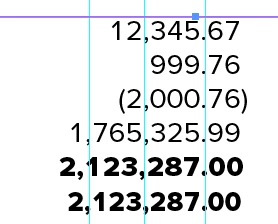
I will be working on an annual report that has lots of tables with financials. In the example below, I've highlighted the numbers which use a decimal tab, Character > OpenType > Tabular Lining with Kerning set as Metrics. The figures line up visually EXCEPT when I change the font weight from Proxima Regular to Extra Bold (next to last line in the screen capture). Is there a way to have mixed weights without faking it with hoizontally scaling (shown in the last line in the screen capture)? 
This topic has been closed for replies.

2 replies

James Gifford—NitroPress
Legend
September 27, 2024

I'm not sure there is any easy or universal solution, only a few that can be optimized for a very specific combination of font and type size.


Multiple paragraph styles might be one solution, but I'd lean towards one TAB FIGURES style for all such numerical columns, and create as many character styles as needed to apply the semi/demi/bold/heavy with tracking, horizontal scale etc. adjusted for alignment.

Robert at ID-Tasker
Legend
September 27, 2024

I've used Myriad:


and it looks like the better way is to move Tab Stop sligthly left - 0.020in - from the initial 3.875in to 3.855in. 


The easiest solution - just use two ParaStyles.