Inspiring
December 18, 2023
Answered

Taux encrage

  • December 18, 2023
  • 1 reply
  • 1528 views

Bonjour,
Je dois préparer un pdf pour une impression. Le profil ISO demandé est le ISOnewspaper26v4. Il est aussi précisé que le taux d'encrage max est de 240%. J'ai bien généré mon pdf en appliquant le profil mais lorsque je vérifie le taux d'encrage du visuel dans "Prépresse" d'Acrobat, il y a des zones qui dépassent largement 240% encre.

J'ai donc 2 questions :

- Le fait d'appliquer un profil ICC en générant un pdf ne limite pas forcement le taux d'encrage

- Recommandez-vous un tuto pour une méthode pour diminuer le taux d'encrage d'un visuel couleur...
 Merci d'avance pour votre aide.

MK 
This topic has been closed for replies.
Correct answer rob day

The ideal would be to go back to the original RGB image. If the CMYK file is being delivered from an unknown source, check to see if it has an embedded CMYK profile—open in Photoshop and check Edit>Assign Profile.


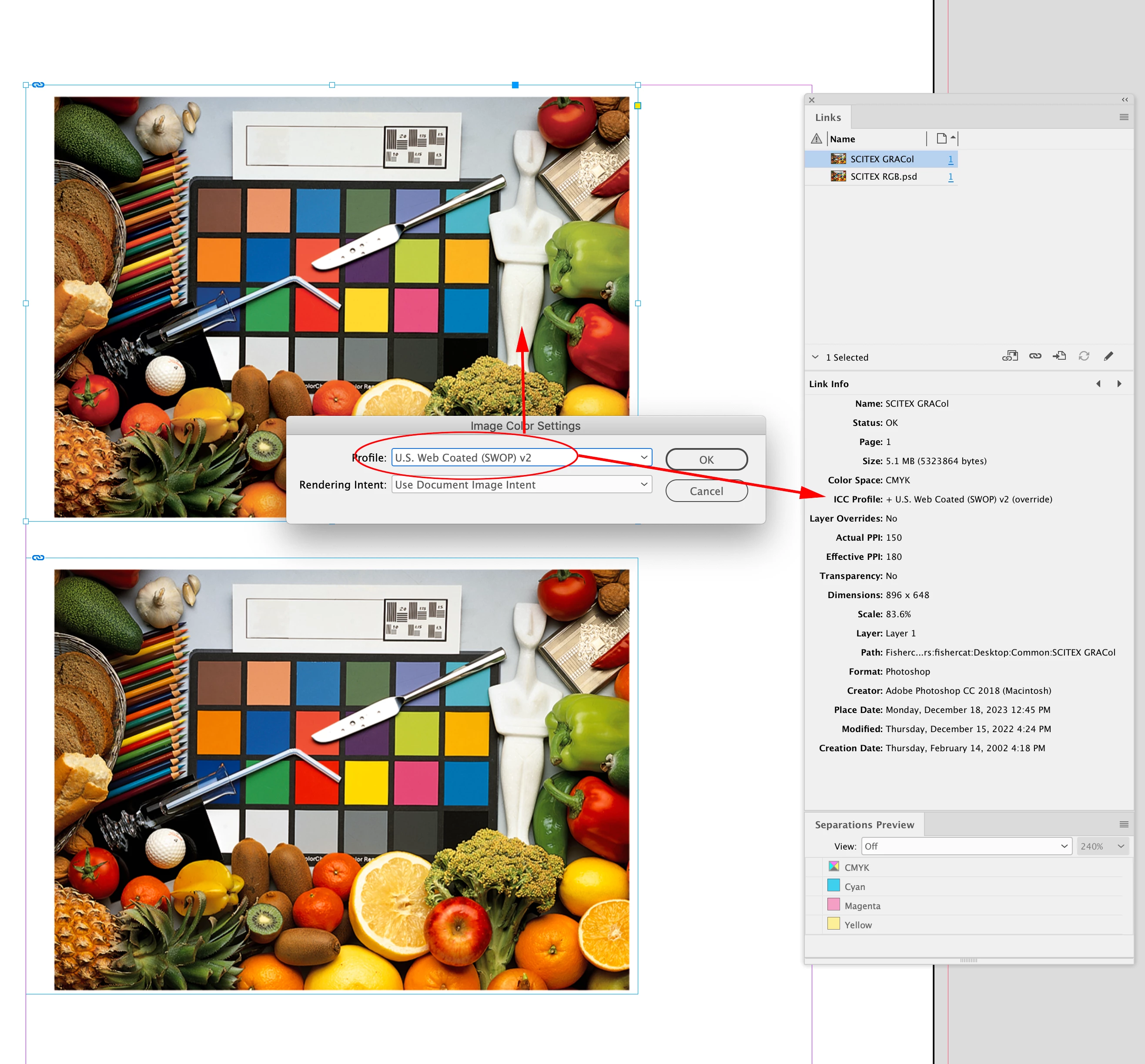
InDesign might ignore CMYK profiles, it depends on the document’s saved Color Management CMYK Policy. If the CMYK image has no profile or it is being ignored, you can override individual image profile assignments via Object>Image Color Settings, and set the profile to something other than Document CMYK. Here I’ve set it to the default US Web Coated SWOP:


Now the top CMYK image’s profile assignment conflicts with my ID document’s CMYK assignment , which is ISO Newspaper v4 26, so on Export there will be a CMYK-to-CMYK conversion and the ISO Newspaper v4 26 total ink limit will be enforced. Separation Preview now shows no total ink over 240%:


1 reply

rob day
Community Expert
Community Expert
December 18, 2023

Hi @mallokw-pro , A CMYK profile enforces the total ink limit only on a color conversion—once the image is converted, there is nothing preventing you from exceeding the limit. So if you place a CMYK image with no embedded profile, which was converted to a different destination profile, its black point might exceed the ISO Newspaper v4 26 ink limit, and it would make it through to the PDF with its values unchanged.


The safest way to avoid total ink problems is to place profiled RGB images and let the conversion happen on Export by setting the Output Destination to ISO Newspaper v4 26. You can use InDesign’s Separation Preview to check document CMYK values and total ink violations before exporting.


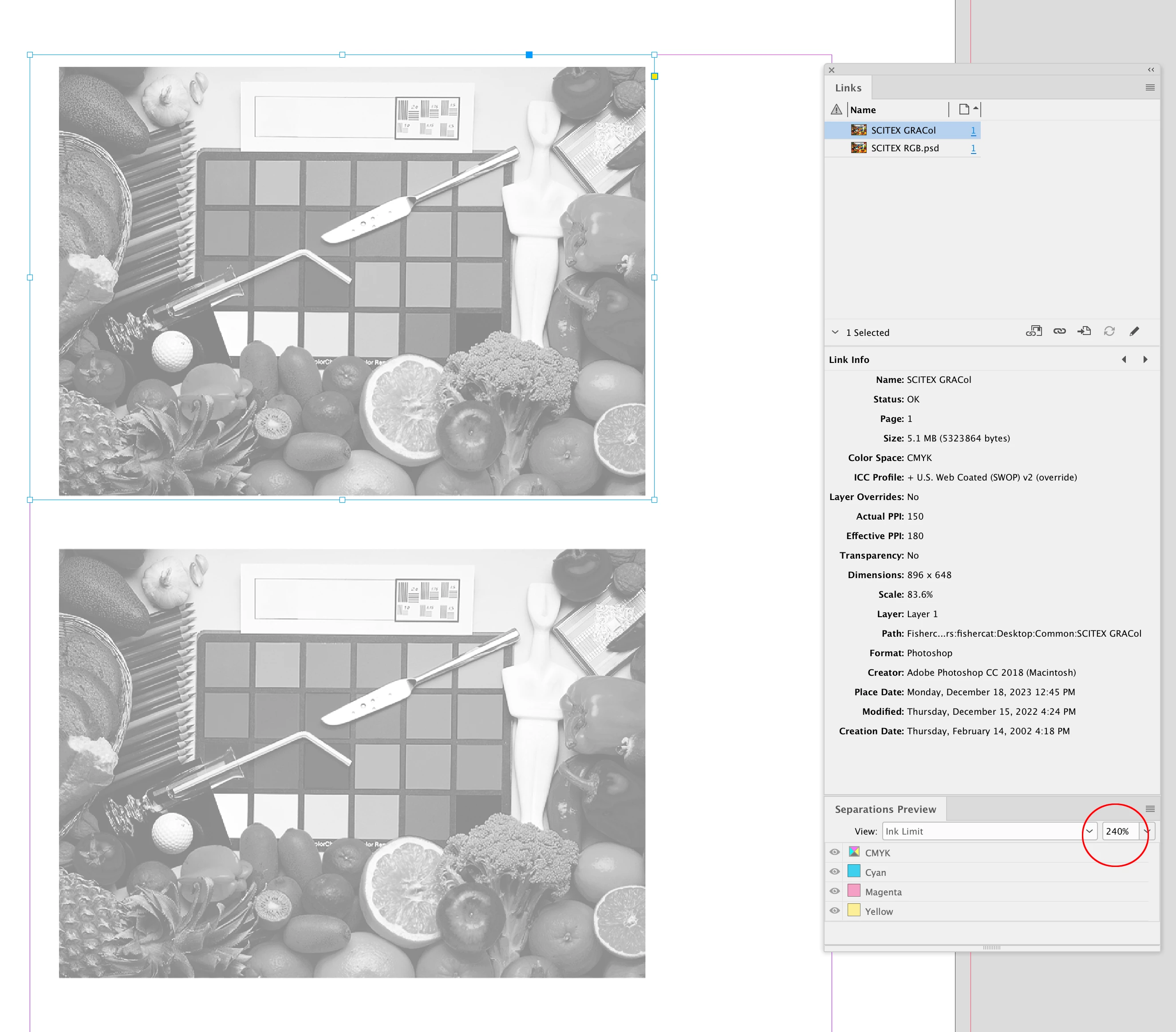
Here the top image was converted to Coated GRACoL in Photoshop—Coated GRACoL has an ink limit of 330%. The bottom image is an RGB image with the AdobeRGB profile embedded. The top image violates a 240% ink limit because of the GRACoL conversion and no profile (Document CMYK). The bottom version has no violations because the RGB image will get converted to ISO Newspaper on the Export:


Inspiring
December 19, 2023

Hello Rob Day,


Thanks very much ! Your answer is very clear.

So it means that if I only get the cmyk image (and not the original RGB file) and that the ink rate is higher than the required profile, I have to re-convert first the image into RGB and then again into the right CMYK profile... What do you think of this process ?

Thanks again for your advice.

MK

rob day
Community Expert
rob dayCommunity ExpertCorrect answer
Community Expert
December 19, 2023

The ideal would be to go back to the original RGB image. If the CMYK file is being delivered from an unknown source, check to see if it has an embedded CMYK profile—open in Photoshop and check Edit>Assign Profile.


InDesign might ignore CMYK profiles, it depends on the document’s saved Color Management CMYK Policy. If the CMYK image has no profile or it is being ignored, you can override individual image profile assignments via Object>Image Color Settings, and set the profile to something other than Document CMYK. Here I’ve set it to the default US Web Coated SWOP:


Now the top CMYK image’s profile assignment conflicts with my ID document’s CMYK assignment , which is ISO Newspaper v4 26, so on Export there will be a CMYK-to-CMYK conversion and the ISO Newspaper v4 26 total ink limit will be enforced. Separation Preview now shows no total ink over 240%: