
Participant
August 20, 2022
Answered

Text appearance frame half off window

  • August 20, 2022
  • 3 replies
  • 221 views

Hey all

Since updating my inDesign to version 17.4 whenever I use the fill/outline options it moves the swatch box off my window in the corner and I am unable to access the settings / half the information in the appearance box.

Is anyone able to help me with a solution to this?
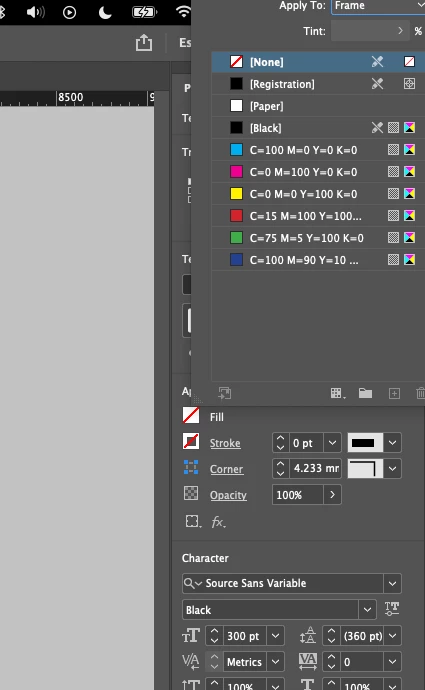
thank you very much

This topic has been closed for replies.
Correct answer Peter Spier

You can also try resetting the workspace.

3 replies

Peter Spier
Community Expert
Peter SpierCommunity ExpertCorrect answer
Community Expert
August 20, 2022

You can also try resetting the workspace.

Harry5E36Author
Participant
August 20, 2022

Thank you Peter, this one worked for me!

Bill Silbert
Community Expert
Community Expert
August 20, 2022

Problems with the interface can often be solved by trashing your InDesign Cache files (which is not the same as trashing preferences).

To do so on a Mac:

The User Library folder in which InDesign’s cache files are stored is hidden by default on most Macintoshes. To access it make sure that InDesign is closed and click on the desktop to launch a Finder Window (Command-N). With this window in column view follow the path User>Home folder (it’s the folder with an icon that looks like a house—it may have the user’s name rather than “Home”) and click on the Home folder. With the Option Key pressed choose Library from the Finder Go Menu. “Library” will now appear within the Home folder. Within the Library folder find the “Caches” folder. Within the Caches folder find and delete the entire folder “Adobe InDesign”. I find that deleting the InDesign cache folder completely leads to a lasting change.

If that doesn't work then try actually deleting preferences. This is often necessary after a program upgrade. It will reset the program to its defaults.

To do so on a Mac:

Follow the instructions for deleting the cache files to get to the User Library folder. Within the Library folder find the folder called Preferences and within it find the folder called “Adobe InDesign” and the file called “com.adobe.InDesign.plist” and delete both that folder and that file. When InDesign is next launched it will create new preference files and the program will be restored to its defaults.

The advantage of manually deleting preference files in this manner is that after you’ve reset up the program (make sure that no document window is open) to your liking, you can create copies of your personalized “mint” preference files (make sure that you quit the program before copying them—that finalizes your customization) and use them in the future to replace any corrupt versions you may need to delete.

Harry5E36Author
Participant
August 20, 2022

Sorry for clarity I am using MacOS! I am unable to drag/move popup window at all!