To sum up with a fix: offset your frames to the left to compensate for this (completely normal, designed-behavior) offset of letters on the left margin. That is, align using the letter's edge, not the frame.
(Note that the offset varies with the font and the font size; it's meant to keep a page of fonts and sizes looking balanced. even though the letterforms might vary between them.)
Issue: I’m experiencing a problem where my text frame does not align properly with surrounding lines or objects. Even when I try "Fit Frame to Content" (Ctrl + Alt + C) or manually adjust the text box, it does not perfectly align with the baseline of other elements.
Details & What I’ve Tried:
The bounding box of the text frame appears to be larger or misaligned, even though the text itself looks centered.
I checked for hidden spaces or line breaks (Type > Show Hidden Characters), but none are causing the issue.
Auto-Size in Text Frame Options was set to Height Only and Both Width & Height, but the frame still doesn’t snap perfectly.
I verified that Baseline Grid and Align to Grid settings are correct, but they don't seem to affect the issue.
Manually adjusting the text frame moves the bounding box, but it doesn’t match surrounding lines exactly.
Question:
How can I ensure the text frame accurately aligns with the surrounding lines and elements?
Is there a setting affecting the bounding box that I should check?
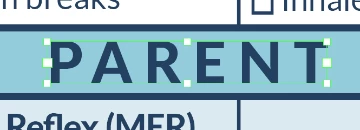
Attached is a screenshot showing the misalignment.
Issue: I’m experiencing a problem where my text frame does not align properly with surrounding lines or objects. Even when I try "Fit Frame to Content" (Ctrl + Alt + C) or manually adjust the text box, it does not perfectly align with the baseline of other elements.
Details & What I’ve Tried:
The bounding box of the text frame appears to be larger or misaligned, even though the text itself looks centered.
I checked for hidden spaces or line breaks (Type > Show Hidden Characters), but none are causing the issue.
Auto-Size in Text Frame Options was set to Height Only and Both Width & Height, but the frame still doesn’t snap perfectly.
I verified that Baseline Grid and Align to Grid settings are correct, but they don't seem to affect the issue.
Manually adjusting the text frame moves the bounding box, but it doesn’t match surrounding lines exactly.
Question:
How can I ensure the text frame accurately aligns with the surrounding lines and elements?
Is there a setting affecting the bounding box that I should check?
Attached is a screenshot showing the misalignment.



 AdChoices