



Answered
Text boxes need to be enlarged after update.
Hey there,
I'm facing a weird issue with my InDesign documents.
I recently updated to v.17.01 and I'm noticing that in my documents when I apply the "fit frame to content" on my older text boxes, there is a bit of space left on top.
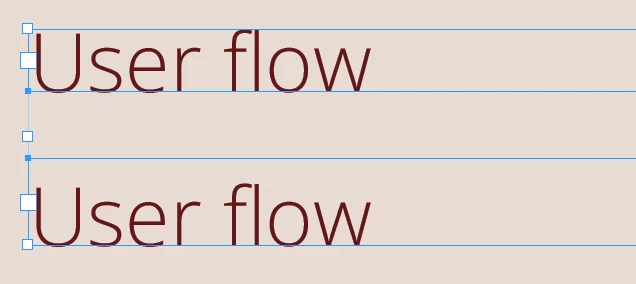
The top box is designed in the prevous version of InDesign, but when I duplicate my page the text gives me an error that it does not fit in the box. I press "fit to content" and I get the box you can see at the bottom.
I don't have "align to baseline grid" selected in this document, so I'm not sure what's going on.
Is there a setting that I might be forgetting about, that was undone by my update, or is this a bug?
Thanks in advance,
Nick
 AdChoices