
Inspiring
July 27, 2023
Answered

Text breaking before end of line

  • July 27, 2023
  • 6 replies
  • 1138 views

Hi all! I'm working in Adobe Indesign 2023 on a Mac. I'm struggling with text that seems to breaking before the end of the line:
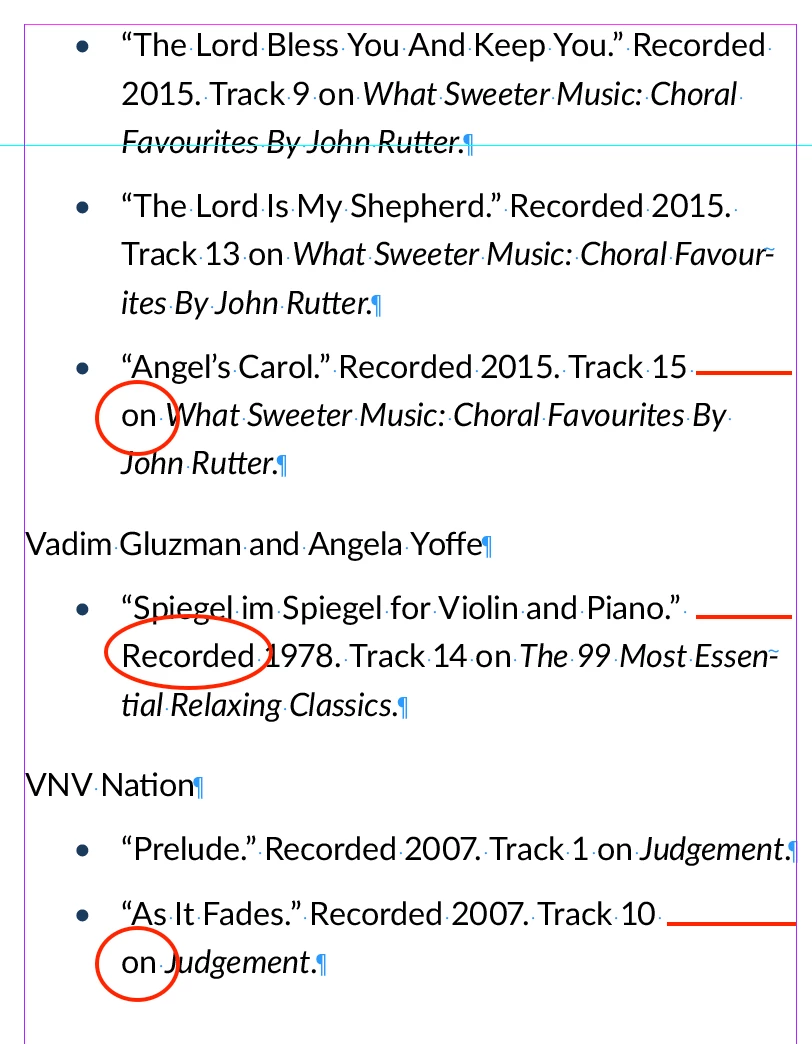
  • These are set up as a Bullet List style, left-aligned. 
  • "Balance Ragged Lines" is unchecked.
  • "No break" is unchecked.
  • No special scripts applied.


What am I missing here? I've spent hours playing with this trying to find and solve the problem, but no luck. Suggestions???
This topic has been closed for replies.
Correct answer Barb Binder

No worries. It just means we are close to the answer!


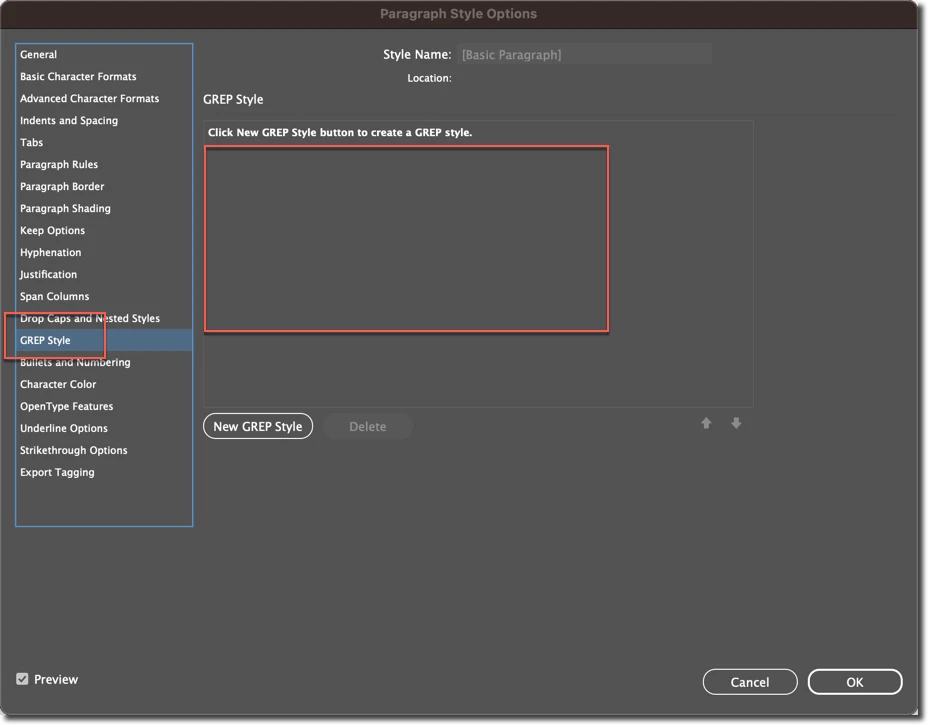
Based on your last screenshot, I think you're going to find that the no break character style is being added via GREP style in your paragraph style. Edit the paragraph style that is assigned to those paragraphs and then you can follow my rectangles in the screenshot below. GREP styles will appear in my empty rectangle on the right. You might either want to work on a copy or take a screenshot of the GREP styles that are listed there in case you want to add them back in another time. They're very easy to remove, but they can be time consuming to figure out how to put back in.


~Barb


6 replies

Barb Binder
Community Expert
Community Expert
July 28, 2023

So glad we could get you back on track. 


~Barb

~Barb at Rocky Mountain Training
Barb Binder
Community Expert
Community Expert
July 28, 2023

By the way, this is a personal preference, but I would re-enable the Paragraph Composer now that you have the answer. You should be good to go.


~Barb

~Barb at Rocky Mountain Training
kg01915Author
Inspiring
July 28, 2023

You are a lifesaver! Thank you for the prompt, clear, helpful support. Love this community!

Barb Binder
Community Expert
Community Expert
July 28, 2023

If you delete it, the issue will go away, so I'd say yes, remove it from the Bullet style definition. If it is working for the Body style which may have longer line lengths, then leave it there. 


~Barb

~Barb at Rocky Mountain Training
Barb Binder
Community Expert
Barb BinderCommunity ExpertCorrect answer
Community Expert
July 28, 2023

No worries. It just means we are close to the answer!


Based on your last screenshot, I think you're going to find that the no break character style is being added via GREP style in your paragraph style. Edit the paragraph style that is assigned to those paragraphs and then you can follow my rectangles in the screenshot below. GREP styles will appear in my empty rectangle on the right. You might either want to work on a copy or take a screenshot of the GREP styles that are listed there in case you want to add them back in another time. They're very easy to remove, but they can be time consuming to figure out how to put back in.


~Barb


~Barb at Rocky Mountain Training
kg01915Author
Inspiring
July 28, 2023

@Barb Binder - This feedback is so helpful—thank you! Indeed, your suspicions are correct—there is a no-break GREP style:

Two questions:

1. Do I simply delete that GREP style?

2. I can see that the Bulleted List Style is based on the Body Text style, to which I do have "no break" applied. Is that how the GREP style got there in the first place?


Sounds like it's time for me to study up on GREP styles!

Barb Binder
Community Expert
Community Expert
July 28, 2023

I see the hidden characters and don't see any manual line breaks. Can you highlight "on judgment" and check (one more time) that no break isn't enabled? And did you check for any GREP styles?


~Barb

~Barb at Rocky Mountain Training
kg01915Author
Inspiring
July 28, 2023

@Barb Binder - well, this is embarassing (and weird). Though I did look at that previously, when I highlighted just those two words, it shows that "No Break" IS, in fact, checked (see below). But when I click on it, to deselect it, it remains checked. I can't seem to deselect it. 


There is no character style applied to the word "on." The word "Judgement" has the New TOTT Style Italic applied. 


I'm sorry to say I'm not familiar enough with GREP styles to even check that. 

Peter Spier
Community Expert
Community Expert
July 27, 2023

Most likely this is just the paragraph composer at work. It looks at the entire paragraph when deciding where to break betwteen lines to give a pleasing rag.

If you want to have more control, switch to the single line composer.

kg01915Author
Inspiring
July 27, 2023

Thanks for that suggestion. I had forgotten about that. Some of it was in Single Line Composer and some was in Paragraph Composer. I've now switched that whole section to Single Line Composer, which addressed a couple of the spots, but not all. I've circled in green below the places where it adjusted. But the red line shows a remaining spot where the line seems to break too soon. (FYI: No "Keep" options are applied here either)


I feel like there must be some little thing I'm missing! Any other thoughts?

Mike Witherell
Community Expert
Community Expert
July 27, 2023

Just wondering how the bulleted paragraphs are made? With a proper paragraph style that defines tab positions, or some other high speed cheat way?

Mike Witherell