
Participating Frequently
December 1, 2016
Answered

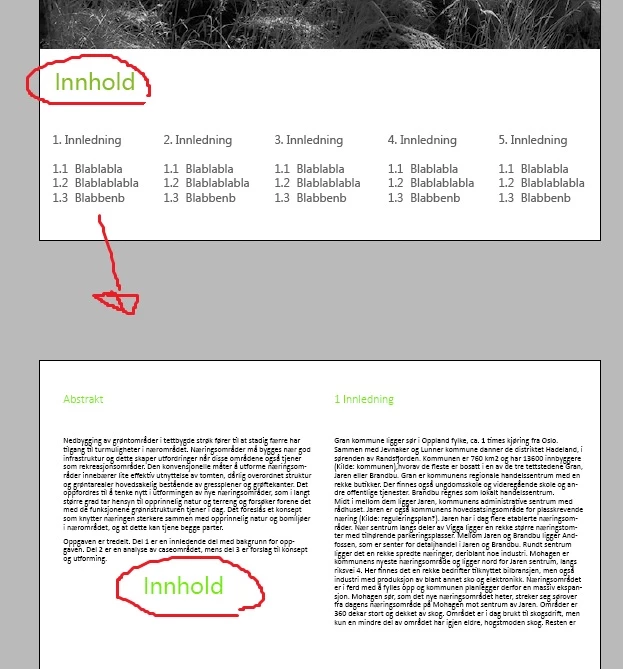
Text changes color when placed on different page even though same RGB code.

  • December 1, 2016
  • 1 reply
  • 2382 views

Hi!

So I've come across an annoying problem; I have some text in green on the first page of my document, but when I drag a copy down to the next  page, or create some text in that same RGB-code on the other page is shows up entirely different. It seems the text placed on the second page is how the color actually looks, and for some reason the color on the first page is dimmed out a little. What can make this happen? I have checked the layer to make sure the text is above everything, and have hidden all objects systematically to rule out anything interfering with the text, still nothing,

What's happening here?

Cathrine
This topic has been closed for replies.
Correct answer rob day

So the entire documents text with that same color will have the same text color I see on the page with the transparency on, when I actually save it, but it's just not showing that "true" appearance while InDesign?


If you set the Transparency Blend space to RGB and turn off Overprint Preview, RGB colors on pages with or without transparency will preview unchanged.  If you turn on Overprint Preview all RGB colors will preview in the document's assigned CMYK color space. Overprint Preview isn't changing the color, you are simply seeing the expected change when the document prints on a CMYK device with that profile. The green you are using is not printable with standard CMYK inks.

1 reply

Dov Isaacs
Legend
December 1, 2016

You might want to check whether there is any existing transparency (including such transparency effects such as drop shadows, feathering, etc.) on one page versus the other. If there is transparency on a particular page, you might be seeing the equivalent of a CMYK preview on that page.

          - Dov

- Dov Isaacs, former Adobe Principal Scientist (April 30, 1990 - May 30, 2021)
gilbucatAuthor
Participating Frequently
December 1, 2016

Aprecciate the answer.

There is some transparency on an object(green colored square) in the first page, but none of the text on that page has the transparency set to the same settings as that object. Does that objects transparency somehow affect the transparency on the text with the same color, and it that case, how do I change it?

Dov Isaacs
Legend
December 1, 2016

It is a matter of whether there is any transparency on the page and how InDesign will display the full page.

If you are creating content for print, the content that you see on the page with the transparency will be the same type of rendering you will get on the entire document when exported to PDF and then printed.

          - Dov

- Dov Isaacs, former Adobe Principal Scientist (April 30, 1990 - May 30, 2021)