Participant
May 20, 2025
Answered

text clearing spontaneously.

  • May 20, 2025
  • 6 replies
  • 601 views

Working on a very large book of 420 pages. i upgraded recently and now at some unknown reason text in a text box will clear spontaneously. Its happened about six times today. I am quite experienced and have no idea what or why.

Correct answer Barb Binder

Hi @josfl:


The fact that undo recovers the text points to user input as opposed to a bug. This could be as simple as using the Enter/Return on the numeric keypad (which enters a Column Break and forces everything after to the next column) vs the Enter/Return on the main keyboard (which starts a new paragraph).
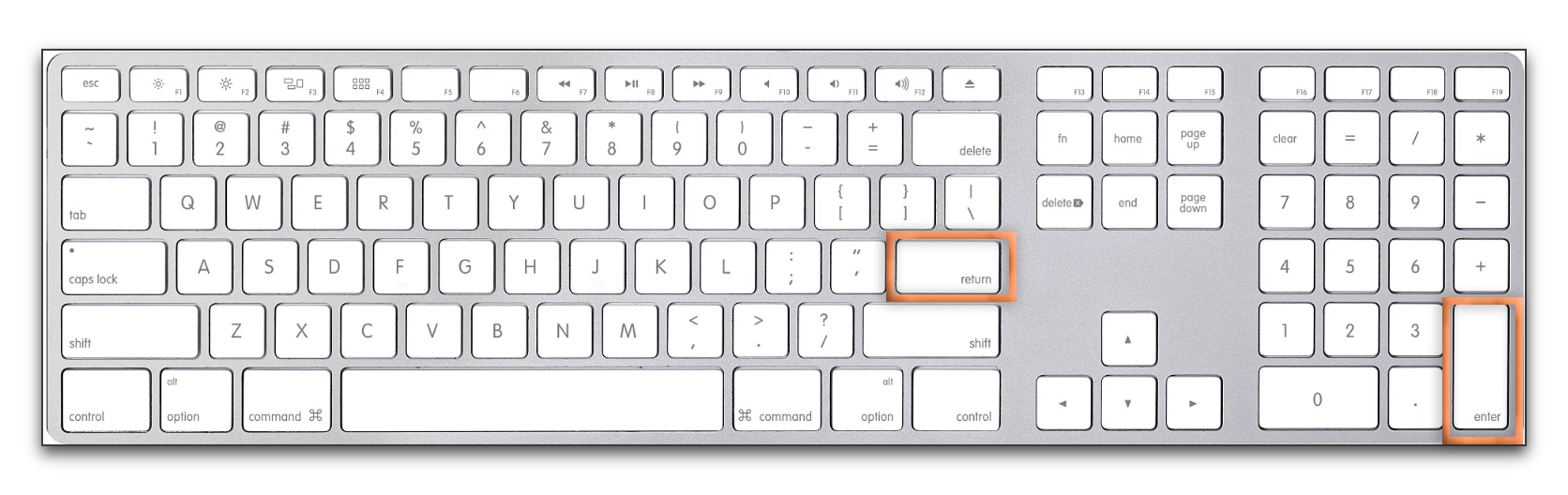
InDesign has other commands that might make the text disappear from that point downward in the file (i.e., Keep Settings and other manual breaks). Secure in the knowledge that undo will bring your text back, the next time it happens please make note of your exact last keystrokes, and before you choose undo:

  • enable Type > Show Hidden Characters and
  • navigate to Story Editor view (Edit > Edit in Story Editor) and grab a screen shot of the same area of text


Then close the Story Editor window, undo to recover your text, save and share the screen shot and your last keystrokes with us. 


~Barb

6 replies

josflAuthor
Participant
May 22, 2025

Thanks-will do. The suggestion "enable Type >" is a good one to have on
file.

joe


[This is a public forum. Personal details removed for your protection.]

Robert at ID-Tasker
Legend
May 22, 2025

@josfl


Again, please do not reply to email notifications - and don't include personal details when replying through website.


Barb Binder
Community Expert
Barb BinderCommunity ExpertCorrect answer
Community Expert
May 21, 2025

Hi @josfl:


The fact that undo recovers the text points to user input as opposed to a bug. This could be as simple as using the Enter/Return on the numeric keypad (which enters a Column Break and forces everything after to the next column) vs the Enter/Return on the main keyboard (which starts a new paragraph).

InDesign has other commands that might make the text disappear from that point downward in the file (i.e., Keep Settings and other manual breaks). Secure in the knowledge that undo will bring your text back, the next time it happens please make note of your exact last keystrokes, and before you choose undo:

  • enable Type > Show Hidden Characters and
  • navigate to Story Editor view (Edit > Edit in Story Editor) and grab a screen shot of the same area of text


Then close the Story Editor window, undo to recover your text, save and share the screen shot and your last keystrokes with us. 


~Barb

~Barb at Rocky Mountain Training
josflAuthor
Participant
May 21, 2025

Hi---query was what version I was using: 20.3.1

I was editing the book yesterday and the problem didn't "surface". Before,
when the text cleared I hit the "undo" and it returned. In the next months
I will be working on the second edition of the book and will let you know if
the problem returns, and try to determine exactly what transpired.


FYI: the book's title is "Origin Story of Fort Road/West Seventh Street, the
Township/City of Saint Paul, the Territory/State of Minnesota: Glacial Age
Forward"

416 pages in version one, hard and soft cover, with 1058 images (85%
vintage) documented with 248 endnotes. It was locally sourced and promoted
and sold out within two months. I am self financing and self-publishing, and
it is the only project via InDesign. But I have been amazed at the
technology that brought it to life!


joe


[This is a public forum Personal details removed for your protection.]

Robert at ID-Tasker
Legend
May 21, 2025

@josfl


Please don't reply to emails - only post through website - and don't include personal contact information.


Abhishek Rao
Community Manager
Community Manager
May 21, 2025

Hi @josfl,


Could you please confirm if you are using InDesign 2025 version 20.3.1 specifically, or another version? Also, is this text-clearing issue happening only with this large book file, or does it occur in other documents as well? It would be helpful if you could test it with a newly created document and with a smaller file to see if the problem persists.

Additionally, as the expert asked, does the text come back after disappearing, or is it permanently deleted? Or could it be that the text is still there but just not rendering properly on screen?

To rule out any system conflicts, please also try running InDesign in Windows Safe Mode following this guide: https://adobe.ly/437nY3f and see if the issue still occurs there.

If possible, please share a short screen recording demonstrating the issue to get a clearer picture and assist you better.


Looking forward to your update!

Abhishek

josflAuthor
Participant
May 21, 2025

ID 2025 latest version; Windows 10; laptop.


Upon reflection it seemed to happen when I moved the cursor into a
paragraph. But not always.

[Personal details removed]

Robert at ID-Tasker
Legend
May 21, 2025

@josfl


"Latest" isn't enough.


But if it's 20.3.1 - try downgrading to something earlier - 20.3 or 20.2 


Barb Binder
Community Expert
Community Expert
May 20, 2025

Hi @josfl:


I think we need some more details to be able to help.

  • What version of InDesign are you using and what operating system?
  • Are you working on the text before it disappears or just paging by?
  • Does it come back?
  • Is it still visible in Story Editor and just missing from the Layout view?


~Barb

~Barb at Rocky Mountain Training