Participant
May 1, 2022
Answered

Text disappears from tabs once exported in Adobe Pro DC

  • May 1, 2022
  • 2 replies
  • 1059 views

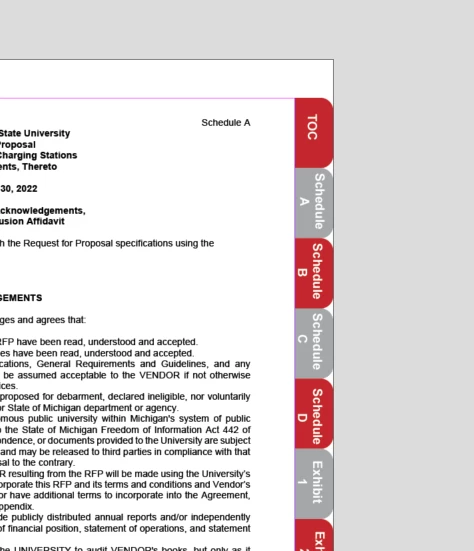
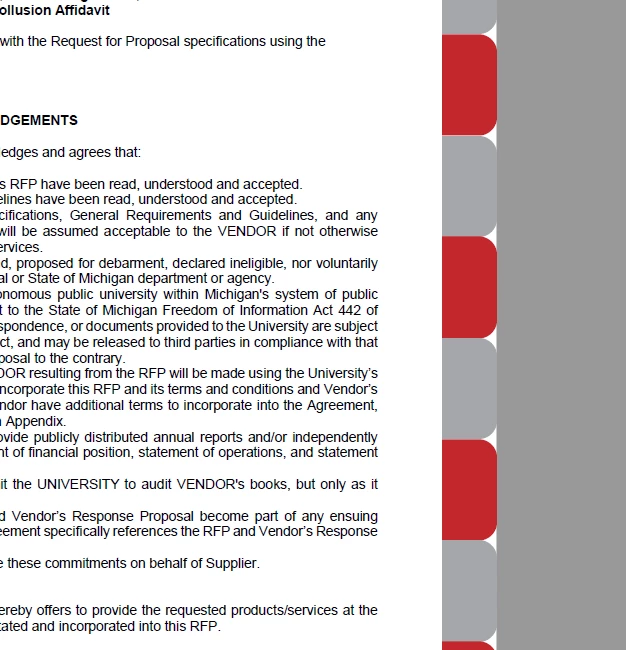
Once I export my InDesign tabbed documents, the wording on each tab disappears. Not sure what to do to fix it. Picture one shows how it appears within InDesign and the second picture is in Adobe Pro DC once exported. Suggestions?
 

This topic has been closed for replies.
Correct answer BobLevine

Is that an interactive PDF? Are those tabs buttons? Is the text part of it or a separate object?


If you're going to use buttons (and I highly discourage that) the text has to be included in the button since interactive items always come to the front.

2 replies

BobLevine
Community Expert
BobLevineCommunity ExpertCorrect answer
Community Expert
May 2, 2022

Is that an interactive PDF? Are those tabs buttons? Is the text part of it or a separate object?


If you're going to use buttons (and I highly discourage that) the text has to be included in the button since interactive items always come to the front.

Participant
May 2, 2022

May I ask why you highly discourage using buttons? This is the first time I am using Indesign for something important. Thanks!

BobLevine
Community Expert
Community Expert
May 2, 2022

Because they don't work in most third-party readers and can even be wonky in Acrobat or Reader. In fact, I've gotten to the point where I see almost no use at all for interactive PDFs beyond simply bookmarks.

Brad @ Roaring Mouse
Community Expert
Community Expert
May 1, 2022

Make sure your tab text objects don't have either Multiply applied (if created in InDesign) or Overprint applied (if they are Illustrator objects).

Also check Layer Options (i.e. if the objects are on a separate layer that has Print Layer unchecked.