

pennyr32544316
Participant
April 8, 2026
Answered

Text Disappears When Creating Hyperlinks in InDesign

  • April 8, 2026
  • 3 replies
  • 29 views

It doesn’t matter if I hand type the text or copy and paste it. I select it to create the hyperlink and when done it’s gone and sitting as overtext. My text box is plenty big enough so I don’t know why this is happening. I can do Undo but then it brings back the text without the hyperlink. 
    Correct answer leo.r

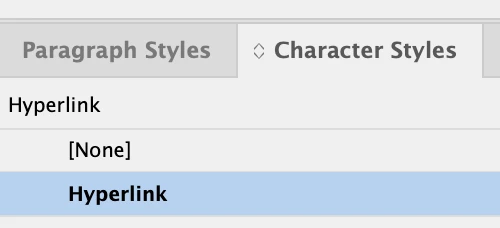
    Check the character style assigned to the hyperlink, as mentioned earlier:


    3 replies

    pennyr32544316
    Participant
    April 8, 2026

    So I noticed the other hyperlinks are hyperlink blue so I changed the problem one to that and it disappeared again and all the text after it. I have other hyperlinks in my document that are working fine. I did  delete the text box and made a new one, I’m not sure what else to check.

    leo.r
    Community Expert
    leo.rCommunity ExpertCorrect answer
    Community Expert
    April 8, 2026

    Check the character style assigned to the hyperlink, as mentioned earlier:


    leo.r
    Community Expert
    Community Expert
    April 8, 2026

    Check your character style assigned to the hyperlink - is it possible that it causes the undesired effect?

    BobLevine
    Community Expert
    Community Expert
    April 8, 2026

    Screenshots and system specs might help, but have you checked the character style assigned to hyperlinks?