
Participant
September 26, 2017
Answered

Text flow option missing

  • September 26, 2017
  • 4 replies
  • 1263 views

Dear forum members,

So often I've already used the text flow in InDesign CS6 and now I can not find the way anymore. Normally text flow should indeed be found under menu window text flow. But he does not appear there as a menu item. To despair ... Did I perhaps completely deactivated the Textumflussmöglichkeit somewhere (accidentally)? does anyone know the problem?

I would be very grateful for a tip.

Thank you,

Kidneys
    This topic has been closed for replies.
    Correct answer Willi Adelberger

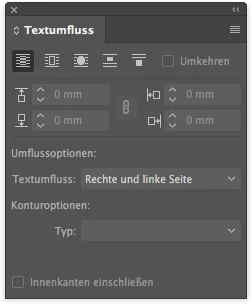
    Das heißt jetzt Textumfluss, aber du kannst ja mit der Alt-Taste auf eine Funktion auf dem Kontroll-Bedienfeld klicken, dann öffnet sich das entsprechende Bedienfeld (früher Palette).

    4 replies

    Willi Adelberger
    Community Expert
    Willi AdelbergerCommunity ExpertCorrect answer
    Community Expert
    September 27, 2017

    Das heißt jetzt Textumfluss, aber du kannst ja mit der Alt-Taste auf eine Funktion auf dem Kontroll-Bedienfeld klicken, dann öffnet sich das entsprechende Bedienfeld (früher Palette).

    winterm
    Legend
    September 26, 2017

    You're on Windows?

    Check Edit > Menus... Isn't it hidden by chance?

    Reset your workspace:

    Window > Workspace > Reset [your workspace name]

    Mirja_HAuthor
    Participant
    September 26, 2017

    Thanks again for your ideas!

    Yes, I am on Windows. So far I checked winterms' suggestions. Unfortunately without success. Under "Edit-Menu-window there is also no such menu item.

    Next I'll try Bill's idea and will let you know...

    winterm
    Legend
    September 26, 2017

    You mean you don't see Text wrap entry at all? Here's in yellow:

    And no Text Wrap icons in Control panel, too?

    Then you should trash your prefs, definitely...

    Bill Silbert
    Community Expert
    Community Expert
    September 26, 2017

    Many times things missing from the InDesign interface can be brought back by deleting the InDesign caches.

    To do so:

    For Macintosh Users: With InDesign closed launch a Finder Window in column view and click on your home folder. With the Option Key pressed choose Library from the Finder Go Menu. Within the Library folder find the “Caches” folder. Within the Caches folder find and delete the entire file “Adobe InDesign”. I find that deleting the cache file completely leads to a lasting change. 

    For Windows Users: Follow the path to C:\Users\[User Name]\AppData\Local\Adobe\InDesign\Version [#]\en_US\Cache.

    winterm
    Legend
    September 26, 2017

    If you're on Windows, what if you hit Ctrl+Alt+W?

    Not sure about Mac, should be Cmd+Opt+W for Text Wrap panel?

    Mirja_HAuthor
    Participant
    September 26, 2017

    Thank you for your Response!

    I tried Ctrl+Alt+W already, but nothing happens... Seems like I somehow deactivated it...