
patskyB
Participating Frequently
January 8, 2020
Question

Text frame auto fitting with an inline image embedded

  • January 8, 2020
  • 2 replies
  • 311 views

Hi folks,

I'm building a catalog in which each product's details are contained within an inline text frame. Within that text frame are various components - another text frame, maybe some text, a table. etc. I'll call the main text frame "frame a" and the embedded text frame  "frame B". An Object Style is applied to Frame a, with the auto-sizing "height only" option selected. Likewise, frame b has the same auto-sizing options selected.


Frame b contains some text and it may also contain an inline image. If there is an image in frame b, the frame a auto-sizing on frame a doesn't work correctly - it allows frame b to extend out beyond the bottom of frame a. See this screenshot:
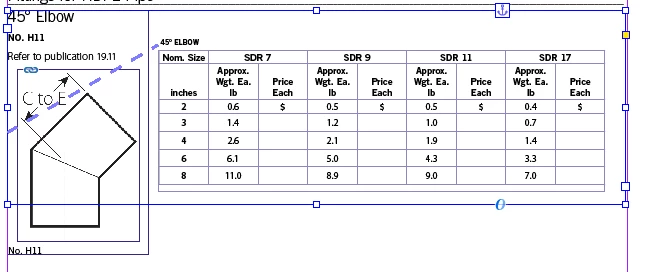


Frame a is selected.

Frame b is the one that contains the inline image.


Here's a link to the InDesign (CC2019) doc in case anybody would like to have a look at it:

https://www.dropbox.com/s/rkjn1qfg0gtp1xf/CatalogUS.indd.zip?dl=0


Thanks for any advice you can offer!

Pat Bensky

This topic has been closed for replies.

2 replies

Community Expert
January 8, 2020

To get the main text frame grow if you:
1. Change contents of the frame with the graphic.

2. Add or remove table rows

you could put all information in one single table.


Regards,
Uwe Laubender

( ACP )

Community Expert
January 8, 2020

Hi Pat,

before doing anything else show invisible characters so you can see in what order the paragraphs are running in your text frame. Then anchor the text frame with the graphic "Above Line" after the paragraph with the table like that:


To control the position of the anchored object vertically decrease the value of distance before.

To control the position of the paragraph with "45° Ellbow" before the table do a top inset of the main text frame:


To align the anchored text frame with the bottom of the main text frame you can give the anchor a negative baseline shift.

In the example below I did a baseline shift of minus 10 Pt. You can see the structure of the main text frame in the Story Editor window below:

First comes the paragraph with an indent above the table reading "45° Ellbow".

Then comes the table in an extra paragraph.

The third element is the anchored text frame with the graphic frame that is anchored "Above Line".


Change the value for the anchor position to your needs after applying the baseline shift. In my example just set it to:

-50 mm - 10 Pt so that the anchored text frame aligns on top and on the bottom of the main text frame:


The main text frame is set to autogrow in height from the top.

If you add more text to the anchored text frame now the main text frame is growing in height accordingly:


Regards,
Uwe Laubender

( ACP )


Community Expert
January 8, 2020

Ok. The negative side of my construction: If you increase or decrease the height of the table you have to adjust the anchor position value for Above Anchor of the anchored frame with the graphic.


Regards,
Uwe Laubender

( ACP )