

kohesion
Inspiring
Feb 22, 2025 12:11 PM UTC
Answered

Text frame - balanced columns

BEGGING FOR HELP! Need to get this file to client yesterday...😱

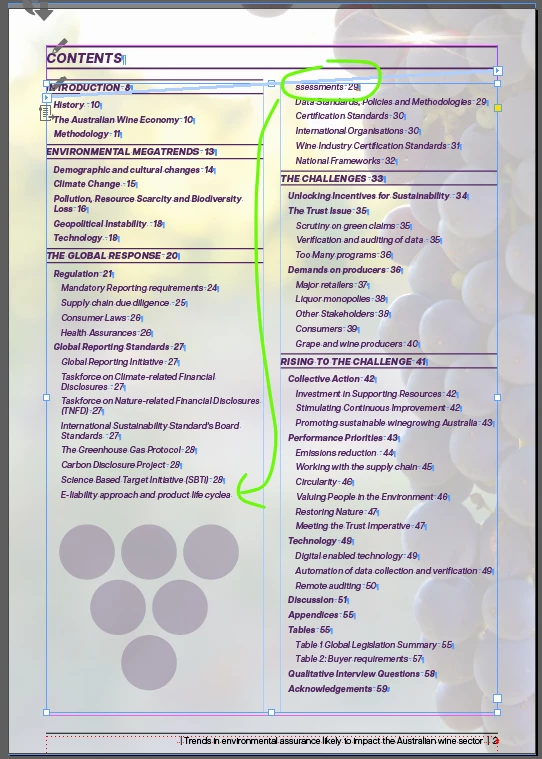
Does anyone know why one word insists on breaking to the next column?

'keep options' is turned off in it's paragraph style; there's not a single character style applied to the word AND columns are set to 'unbalanced' ... it makes no sense!


[basic Paragraph] style DOES have 'keep lines together' (At start/end of paragraph  | Start: 2 lines | End: 2 lines are the settings) Is it possibly something to do with that?! See pic for reference...

 

jmlevy
jmlevyCorrect answer
Community Expert
Feb 22, 2025 2:12 PM UTC

Thank you so much! But... it's not ticked in the original document 😥 I don't understand why it shows in the copy and paste version but not the original?!


I should not have written "untick" but the problem is with "keep with next". Set it to 0 instead of 1 (lines).

15 replies

jmlevy
Community Expert
Community Expert
Feb 22, 2025 12:17 PM UTC

Did you check if there is a text wrap on the six circle triangle shape under your text? 

Translate
kohesion
kohesionAuthor
Inspiring
Feb 22, 2025 12:49 PM UTC

sadly, there is not. But was a good idea to check, thank you!

Translate
Kind regards, Dani
jmlevy
Community Expert
Community Expert
Feb 22, 2025 1:07 PM UTC

Can you share the file? Or just copy paste this frame in a new file and share it?

Translate