Inherited an Indesign file and can't figure out how this text frame within text frame works. The boxes within have different tabs length on the top. Checked anchored objects and it doesn't seem to be it. Anyone with ideas? (Used filler text in e.g. screenshot for privacy here)
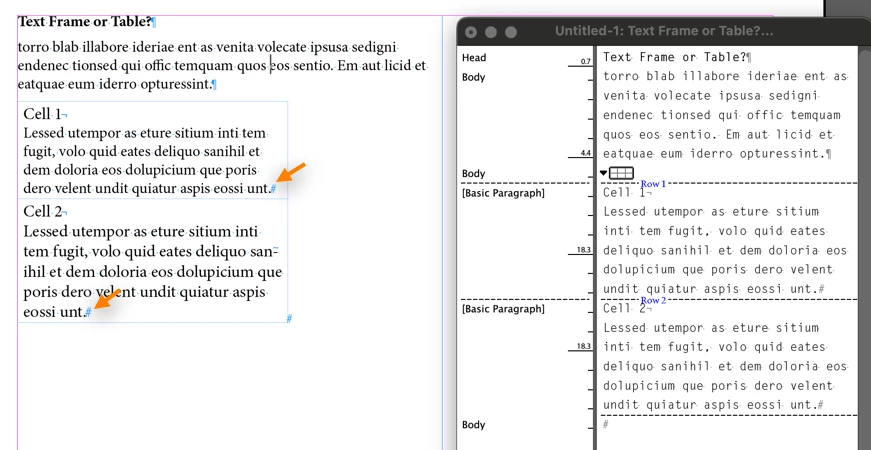
That looks like a table to me.... see the hashtags at the end of each cell? It just looks like a frame to you and the others on this thread because the borders have been disabled and you can see the blue table edges.
You can confirm this if you click inside the table and tap Ctrl/Cmd Y to view in Story Editor.
Just wondering if this is a useful way of working?
I forgot this part of your question—based on the file that you have shared with us, there's no need for a table here. You can get the exact same look just using paragraph indents/spacing. Even if you want to put a border around the head/body paragraph combo, you can do that with paragraph styles. In my mind, a table is just extra work.
Tables don't have anchors—only anchored frames have anchors. A table sits directly on a hard return marker (or an end of story marker).
You can resize the table by either dragging the right side with the Type tool (or for a multi-column table) you can resize all the column by holding the shift and dragging the right side with the Type tool.
Thanks for all the answers. I've attached the file here. After trying out a bit it does seem like a table although I can also cut it out but it then becomes a single cell table when I paste it. Not sure how to acheive a table with different cell widths. Just wondering if this is a useful way of working? A table with different cell widths?
Ok tried it out a bit more. It seems it was a table pasted into a text frame. Strangely the original doesn't show the anchor icon whereas when I did a it, it shows.
That looks like a table to me.... see the hashtags at the end of each cell? It just looks like a frame to you and the others on this thread because the borders have been disabled and you can see the blue table edges.
You can confirm this if you click inside the table and tap Ctrl/Cmd Y to view in Story Editor.
To put a text frame within another text frame, first create one text frame.
Enlarge the frame if you need to make room for another frame within it.
Create a second text frame. Selecct the second text frame with the Selection tool, cut it.
With the Type tool, click inside the first text frame where you want to place the second text frame, and Paste it.
If you want to remove a text frame that is nested within another text frame, select it with the Selection tool. Cut it. Click ouitside the original text frame and Paste.
Those text frames were pasted into the main text frame. Switch to the selection tool (V), and select one. Then open the Object-->Anchored Object-->Options. It should be set to "Inline". You should be able to "release" each text frame with the Release option in the same menu.





 AdChoices