

Question
Text frames close together: get content by script
First of all: the hardest part is done. 🙂
Hello!
From a document with a variable number of pages, in which (article-describing) texts with a table belong together, I need the content of both in succession: Text1 + Table1, Text2 + Table2, Text3 + Table3, etc.
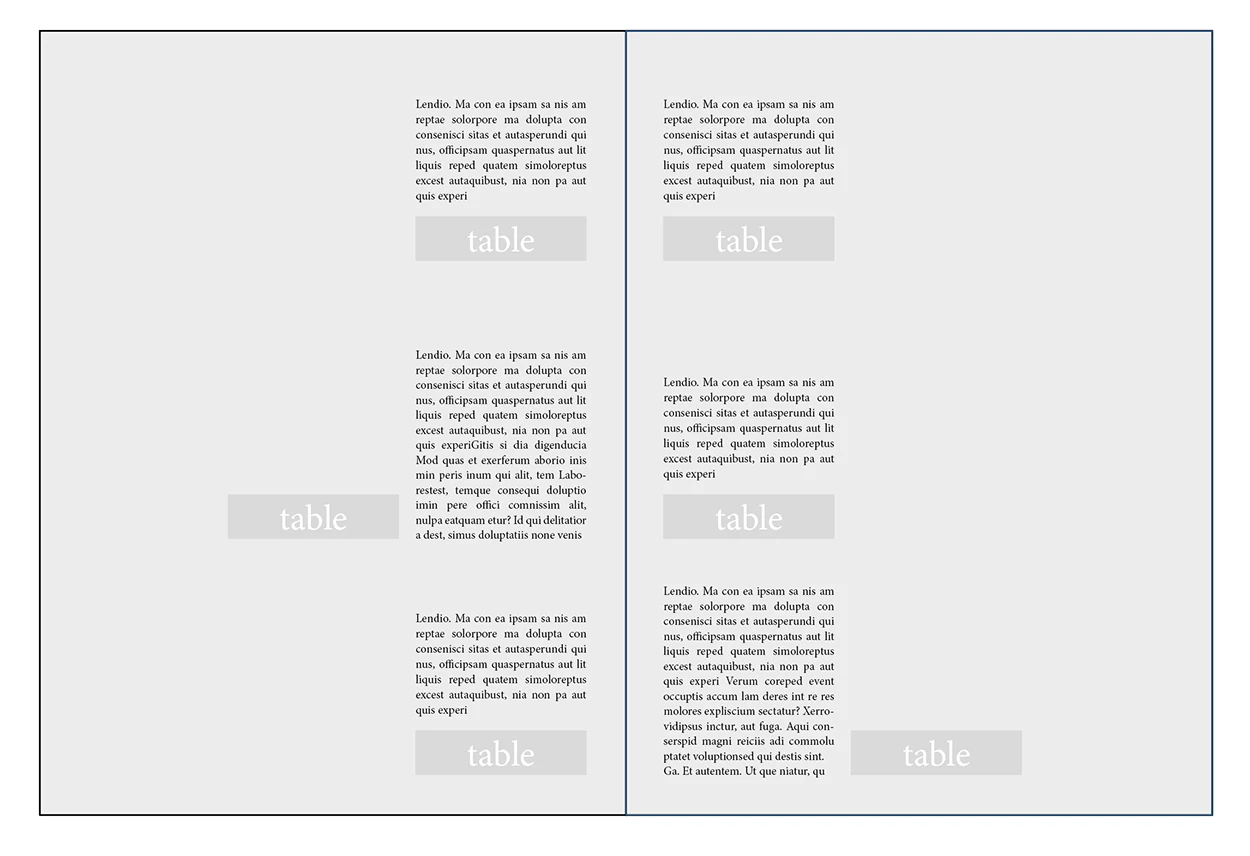
There is no "physical" connection between the two. They are just close together. Can I do something with it?
What I´ve done, yet is the script grabbing the content of the tables.
var myDoc = app.activeDocument;
var myPages = myDoc.pages.everyItem();

var allTextFrames = myPages.textFrames.everyItem().getElements();
var numberOfTextFrames = myPages.textFrames.length;
var myTabs = [];

app.doScript(funktionAusführen, ScriptLanguage.JAVASCRIPT, undefined, UndoModes.ENTIRE_SCRIPT, "DoIt");
function funktionAusführen(){

    for(var i=0; i<numberOfTextFrames; i++) {

        if(allTextFrames[i].tables.length > 0){
            myTabs.push(allTextFrames[i].tables[0]);
            }
        }

    var numberOfTables = myTabs.length;
    var myTableContent = [];
    var myTexts = [];

    for(var t=0; t<numberOfTables; t++) {
            var thisTab = myTabs[t];
            var allRows = thisTab.rows.everyItem().getElements();

            for(var n=0; n<allRows.length; n++) {
                var myRows = thisTab.rows[n] ;
                var thisRawContent = thisTab.rows[n].cells.everyItem("\t").contents.join(';');
                myTableContent.push(thisRawContent, "\r").toString();

                }
            myTabs.push(myTableContent);
    }

    var res = myTabs.pop('').join('').replace(/;/g, '\t');

    var textKasten = myDoc.textFrames.add({geometricBounds: [75, 106, 250, 198]});
    textKasten.insertionPoints[0].contents  = res;

    app.findGrepPreferences = changeGrepPreferences = null;
    app.findGrepPreferences.findWhat = "(~b(?=Menge))";
    var found = app.findGrep();
    app.changeGrepPreferences.changeTo = "\\r\\r";
    app.changeGrep();
    }
I just need plain text with no styles. It is used in an external text editing program.
 AdChoices