
Participant
June 6, 2024
Answered

Text highlighting not aligned with text

  • June 6, 2024
  • 1 reply
  • 437 views

Hi


I am a relatively new InDesign user


I have a problem with certain pieces of text in an InDesign document exhibiting weird highlighting as shown below
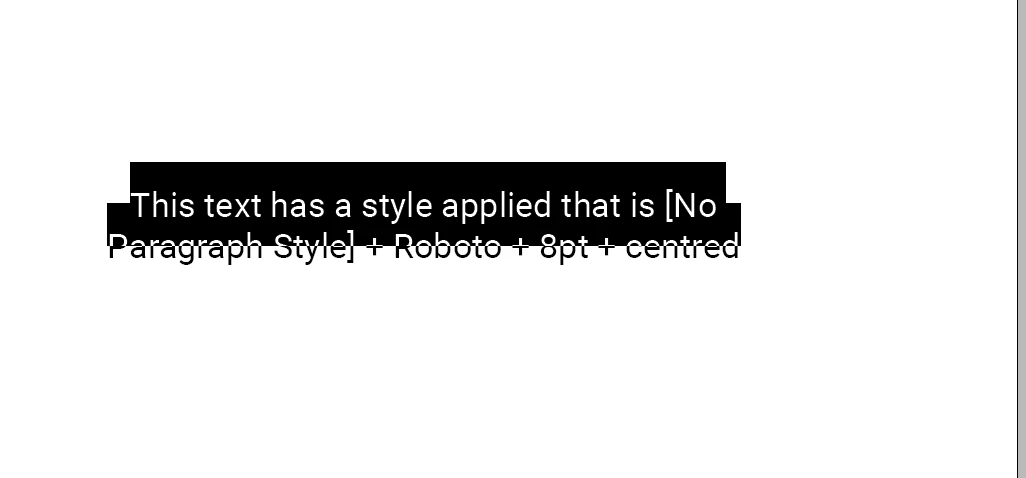
 

I find the built-in [Basic Paragraph] style exhibits this (in this document) and also the style shown above which is [No Paragraph Style] + Roboto + 8pt + Align: Centred


I have run the cleanup tool and done a fresh install of InDesign. I sent my document to Adobe and they said the issue is not due to file corruption


Any clues?


Thanks

This topic has been closed for replies.
Correct answer Paul22570366d9ho

It's worse that that!

All my styles seem to have Baseline Shift to -5 in the text but not in the definition

If I change to -4 (say) I get a + next to the style. Same for 3, 2 and 1.  However when I set to 0 (on the control bar) the + sign disappears

So it's as if it thinks -5 and 0 baseline shift are both the same as the style definition

Aghhh?


OK, sorted


Somehow there were charact and paragraph styles applied


I removed the charact styles and then the pargraph style was ok


Thanks

1 reply

jmlevy
Community Expert
Community Expert
June 6, 2024

Baseline shift is applied to the text:

Participant
June 6, 2024

Many thanks for this


I thought it might be that but I checked and the font defininition has baseline shift set to 0


However as you correctly suggest, if I click on the text the control bar shows a baseline shift of -5

However there is no + sign next to the font so it has not been modified!

How can you have a style applied to a block of text and yet the text has different characteristics than the style definition?

This relates to another issue I have encountered when I apply a style to a block of text and the text is changed to a much larger font size than in the style definition. What can cause that?

Participant
June 6, 2024

It's worse that that!

All my styles seem to have Baseline Shift to -5 in the text but not in the definition

If I change to -4 (say) I get a + next to the style. Same for 3, 2 and 1.  However when I set to 0 (on the control bar) the + sign disappears

So it's as if it thinks -5 and 0 baseline shift are both the same as the style definition

Aghhh?