
Inspiring
August 17, 2017
Answered

Text hyperlink to the next page

  • August 17, 2017
  • 5 replies
  • 7777 views

Does anyone know if there a way to create a very simple text hyperlink that links to the next page? I have been manually creating text anchors to text on the next page but the document is too long to continue in this fashion. I also don't want this on every page so setting something on a master page isn't practical. I don't want to directly link to a specific page either because the document page order and count might shuffle before the final publish. Any ideas on how to achieve this? TIA!
This topic has been closed for replies.
Correct answer amaarora

Hi,

If I understood correctly, what you are trying to say can be very easily done in InDesign.

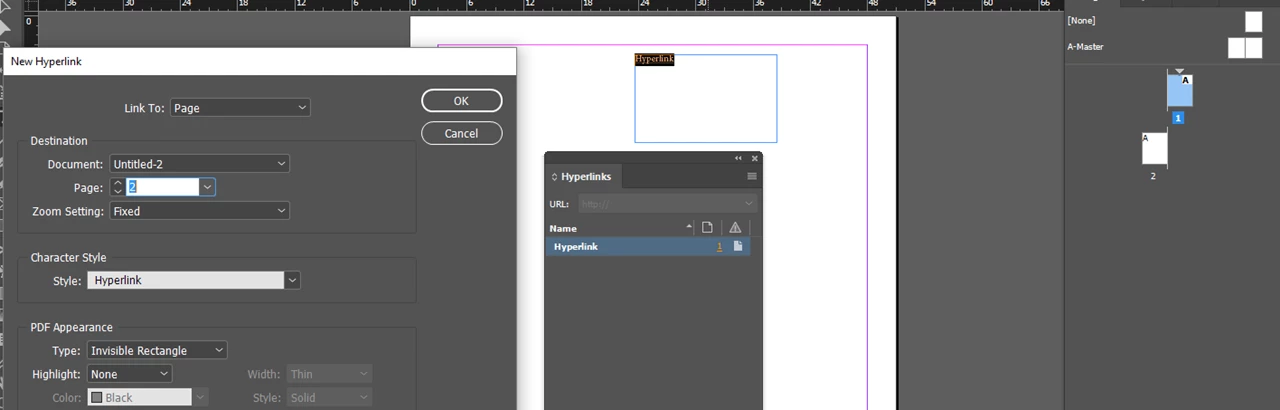
Here, added some text. Opened the Hyperlinks panel.. and then using the option made it a hyperlink to a Page using "Link to". I then choose the document(which in your case is the current document) and the page number i want the text to be linked to.(which in your case is current page+1.. you will have to do this each time)

Now lets say i added 3 pages before page 2 so that it becomes page 5, my hyperlink destination will change automatically.

-Aman

5 replies

Guille V @illustraworks
Participant
October 10, 2023

For "next page" and "previous page" buttons in InDesign, better use BUTTONS & FORMS. If you want to create a PDF, do the buttons as WITH FOCUS (PDF) or WITHOUT FOCUS (PDF) and add the action you want.

Inspiring
August 17, 2017

Hi there. I think this will work for what I need. Thank you

Barb Binder
Community Expert
Community Expert
August 17, 2017

Hi Erica:

Can you use a cross-reference? And what are you publishing to? PDF? Publish Online?

~Barb

~Barb at Rocky Mountain Training
amaarora
Community Manager
amaaroraCommunity ManagerCorrect answer
Community Manager
August 17, 2017

Hi,

If I understood correctly, what you are trying to say can be very easily done in InDesign.

Here, added some text. Opened the Hyperlinks panel.. and then using the option made it a hyperlink to a Page using "Link to". I then choose the document(which in your case is the current document) and the page number i want the text to be linked to.(which in your case is current page+1.. you will have to do this each time)

Now lets say i added 3 pages before page 2 so that it becomes page 5, my hyperlink destination will change automatically.

-Aman

BobLevine
Community Expert
Community Expert
August 17, 2017

What is the intended output?