Participant
April 12, 2017
Answered

Text & Image frames

  • April 12, 2017
  • 1 reply
  • 2950 views

I'm working on a catalogue that vcomtains text, images & tables. I'm sure that before today all the frames round the text and tables were red, & round the images were green.
Now I have a mix of red & green text and table frames. . When I look at the layers pallette it shows me that a green frame shows an image and a red frame shows text. No in my deocument it doesn't!

How do I put my text and table frames back to red please?

Secondary question - why are the frames round tables often smaller than the table itself?

Many thanks.
    This topic has been closed for replies.
    Correct answer Barb Binder

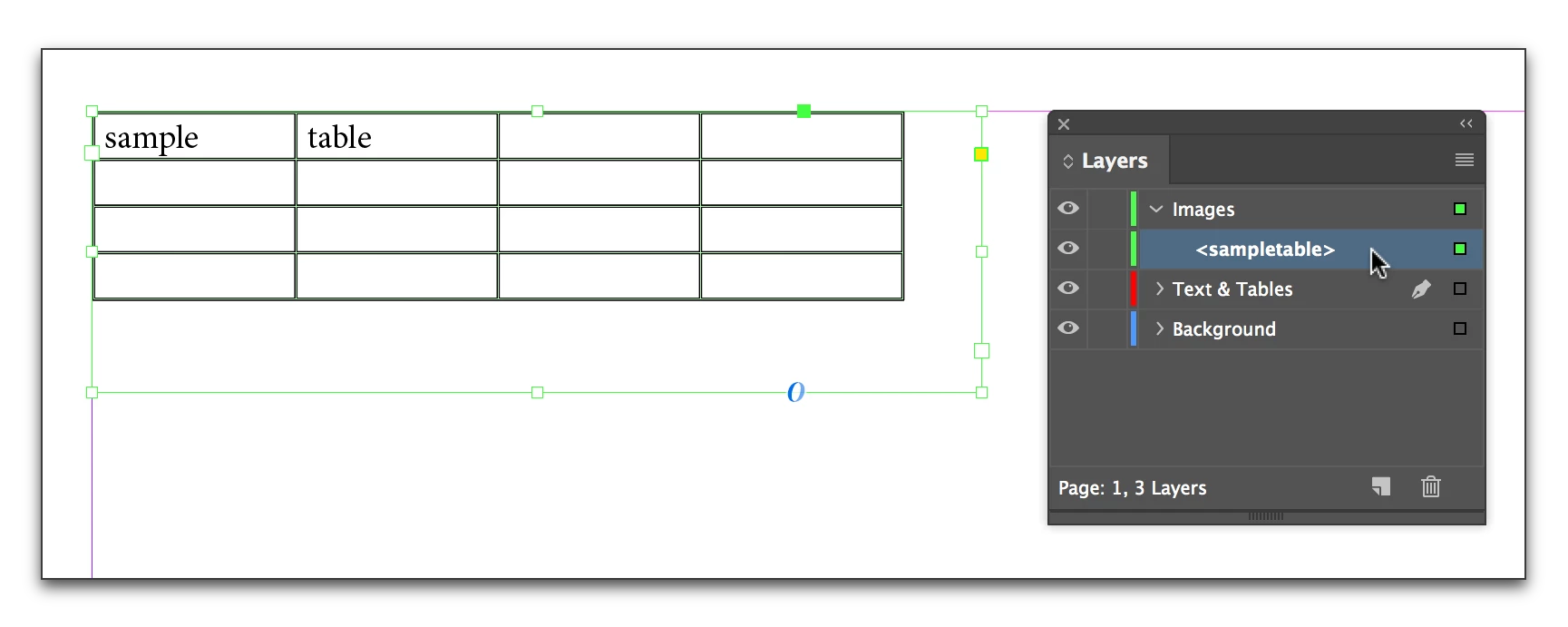
    The red and green frame edges indicate what Layer they are on. Based on your description, your text layer is red and the image layer is green. You can drag the dot (or the layer name) to move them from one layer to another. The color will change as the element changes layers.

    Secondary question - why are the frames round tables often smaller than the table itself?

    Hard to say since we haven't seen your file, or watched the layout workflow. You can adjust the frame sizes by tugging on the corners with the Selection tool.

    1 reply

    Barb Binder
    Community Expert
    Barb BinderCommunity ExpertCorrect answer
    Community Expert
    April 12, 2017

    The red and green frame edges indicate what Layer they are on. Based on your description, your text layer is red and the image layer is green. You can drag the dot (or the layer name) to move them from one layer to another. The color will change as the element changes layers.

    Secondary question - why are the frames round tables often smaller than the table itself?

    Hard to say since we haven't seen your file, or watched the layout workflow. You can adjust the frame sizes by tugging on the corners with the Selection tool.

    ~Barb at Rocky Mountain Training
    BobLevine
    Community Expert
    Community Expert
    April 12, 2017

    Frames aren't contained by the left or right margin. Never have been.

    Edit: TABLES aren't contained....

    Barb Binder
    Community Expert
    Community Expert
    April 12, 2017

    Do you mean tables, Bob?

    ~Barb at Rocky Mountain Training