


Text is glitching when I scroll
Hi
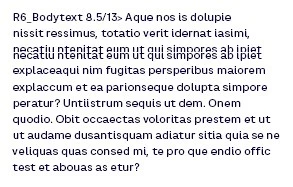
I've got a new laptop and since installing Indesign its been glitching the text when I scroll up and down (example attached). Adobe support couldn't help, I've reinstalled the application, I've reset preferences, I've done all the display performance correct settings etc and I'm now at my wits end. Also when I drag my text frame to a point (say 25) it doesnt think its there and hovers above the line instead of clicking to it but when I let it go its at the correct point. It is also making my guides in normal view look distorted.
If I zoom in or out it seems to correct the distortion but as soon as I scroll again another piece of text will go weird in another place. I also plugged in an external monitor and the same issue. This is happening on all InDesign documents, but not other text documents.
Is it my new laptop thats the issue?
Thanks, Nicola
System details
Windows 11
InDesign 21.0.2.x64
ThinkPad X1 Carbon E15 Gen 2
 AdChoices