
November 3, 2011
Answered

Text jumping around in text box. NOT related to text wrap.

  • November 3, 2011
  • 14 replies
  • 91796 views

We are having an issue with some of the text jumping around in the text block while we are making edits to the text. It is not related to text wrap.

We hadn't seen this problem until we converted from CS4 to CS5.5.

The background:

We use a proprietary page generation system. This generates IDML, which we open in InDesign. We then pull this information into our CS5 templates. This system has always worked fine in the past. Now, however, we are having this odd problem. The only thing that has changed is the version of InDesign.

What happens:

In some cases we are editing a word, changing punctuation, moving something within a table, or even just changing the color of a letter. When it is triggered, the text from the body of the text block jumps around in the box (many times ABOVE the headline information). Normally the movement is upward, but it makes longer edits very tricky as the lines are moving around within the text block.

What we do when it happens:

Usually, if we find a safe place within the text to type a return we do that, then delete that return. This solves the problem, but only temporarily. If the file is opened and closed, it goes back to jumping.

Why this is a big issue for us:

We are working on catalogs, some with more than 400 pages. There are large amounts of items. Much of the time we have to make global changes with find/replace and GREP replace. This often causes situations where the text jumps and we don't notice. It can even happen when we are checklisting our files (right before it goes to the printer). This makes us very nervous.

Does anyone have any knowledge that might be able to help us?

Thanks!
Correct answer Markuslabuschagne

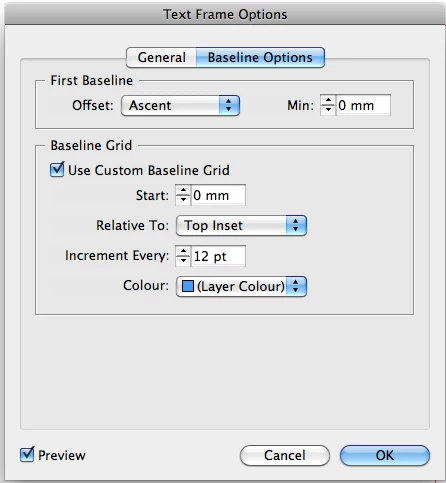
I just had the exact same problem. I experimented with Text Frame Options and found a possible sollution: Under "Baseline Options" tick "Use Custom Baseline Grid" (see screen shot attached). In my case the text stopped jumping and hopefully it will help someone out there too.

14 replies

Participant
August 11, 2022

Hey - may have another possible solution. Bring up Paragraph Styles. Double click on the paragraph style for the problem text. Double click Basic Paragraph if thats all you have. Under Indents and Spacing make sure 'Align to Grid' is set to none. Credit my boss Shane K for this one.


Participant
May 9, 2022

LEADING NOT CHANGING FOR SEVERAL POINTS AT A TIME.

related to the text jumping?

I'm also having issues with changing leading, where I will reduce it manually one point at a time and it will not change (decrease or increase) for several points, and then it will final work, but it's way too tight or open. Again, these issues happened at about the same time and have never happened before EVER. And I have been using this program since it was created. 

Again when the Adobe rep removed any Paragraph or Character Styles it stopped. 

 I've always been able to stray from the applied Paragragh or Character style before without issue. If I remove the style, the text changes to defalt font & size... NOT what I want. ?????

HELP Please as this seems like a BUG to me.

jmlevy
Community Expert
Community Expert
May 9, 2022

It seems that your text is aligned on the baseline grid.

Participant
May 10, 2022

I'll take a look at that again. The online Adobe support looked at that, but maybe they missed something.

Thanks!

Participant
May 9, 2022

JUMPING TEXT WITH TEXT BLOCKS

I have been having this same problem happen for about 2 months on multiple documents, spent hours on the phone with Adobe reps. The problem got escalated and the third rep "fixed it" by clearing any overrides that existed within Paragraph Style, but then any text with tiny changes reverts to original style. The jumping stopped, but that is not a solution! This is a BUG that needs to be remedied. have never had to create character styles for every single tiny change I want to make to text. 

Examples:

  • a few words in a paragraph to be italizied, bolded or underlined
  • tighten the kerning to remove a widow at the end of a parapgrah
  • reducing the size of a ©, ®, ™


Note per other answers in the community:

  • These issues have not been just within TABLES, so that's not issue
  • I have always used magic mouse and that cannot be the problem


Participant
September 8, 2021

Had the same issue!! Thank you so much for solving this for me too!

Known Participant
February 2, 2022

Thank you!!!!

Filip Yellow Submarine
Participant
July 15, 2021

Reinstall the fonts you are working with in the file were you have the problem. I had the same problem, tried everything: reinstalled indesign, reinstalledcreative suite. It kept comming back, even on a brand new computer (The new computer was installed from a timemachine backup). A collegue suggested a font problem. It was the Roboto font. Deleted it and reinstalled a new set of the font from another mac who didn't had the problem. Problem solved - Finally

MarkiMark
Participant
January 14, 2021

Fantastic, thank you Markus.

Participant
October 6, 2020

I found I had a similar issue but it was a hidden layer I had underneath that had an object with Text Wrap set (despite having hid that layer). What I did to fix this was, right-click on the layer for layer options, and selcted "supress text layer when layer is hidden", and it solved the issue of the text jumping around.


Participant
June 30, 2020

Indesign 5.5 - Found under "Object/Text Frame Options/Baseline Options (tab)"

Participant
April 5, 2020

This solved the problem for me. Thank you!!

Participant
November 12, 2013

Hi miwvawy,

I had the exact same problem and it was fixed by the baseline option that Markuslabuschangne suggested.

I wish it would work for you too.