
ajandel06
Participant
July 7, 2020
Answered

Text moves way down after selecting Enter - Disappears

  • July 7, 2020
  • 3 replies
  • 2641 views

I am relatively new to InDesign and taking a course on this. I must have changed something somehow and can not get it to default back. If I am typing text in a text box and hit enter later to revise the spacing, it moves the text way down and indicates the text has moved out of the text box view. However when I make the text box bigger, MUCH bigger, I still can not see or find the text. The only way to bring it back is by deleting the enter.
This topic has been closed for replies.
Correct answer Bill Silbert

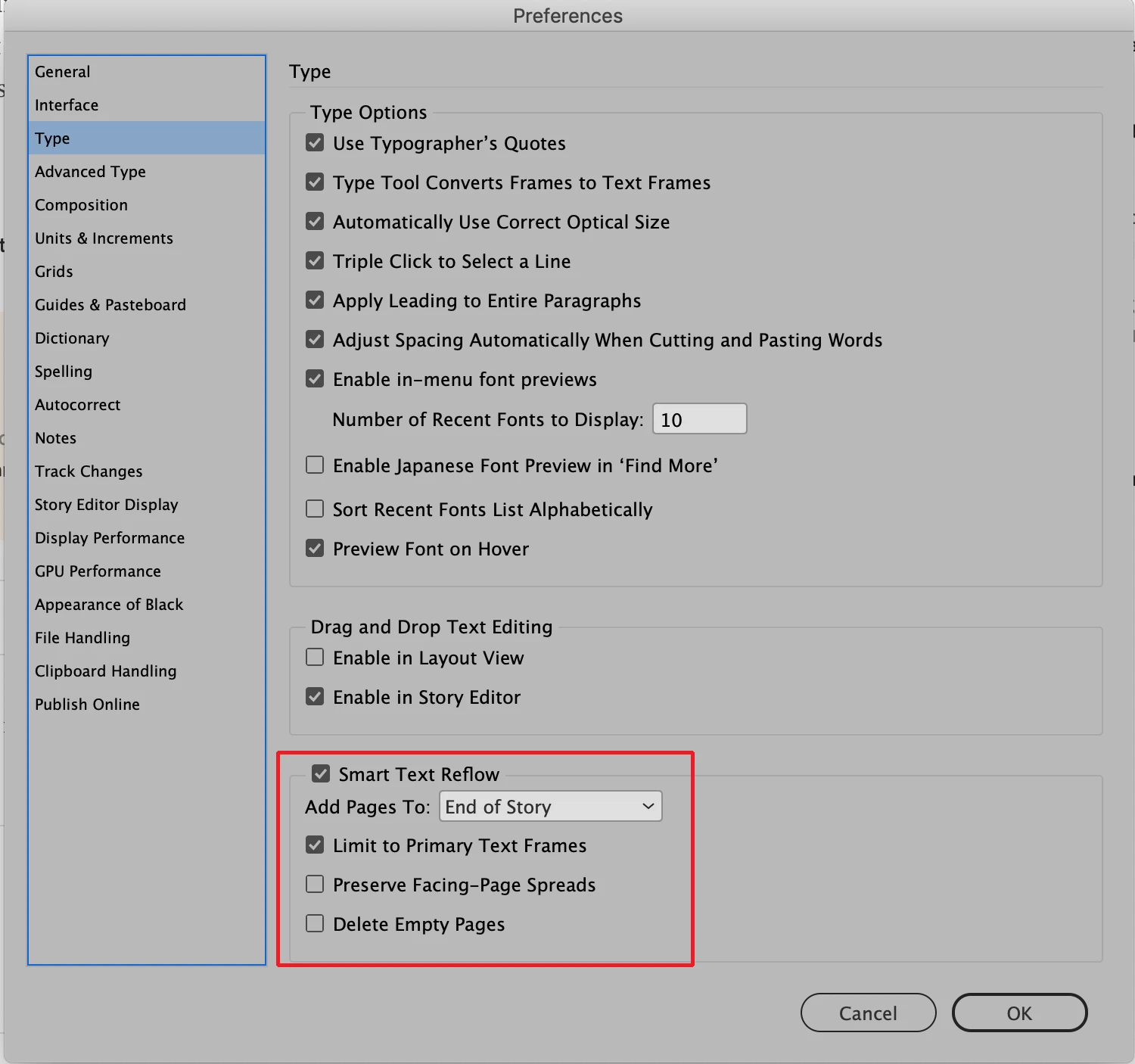
Are you seeing a red square with a cross in it in the lower right of your text frame? If so that means that by hitting the Enter key—which actually moves text to either a new column or to another text frame that has been linked to the first text frame—you've flipped the text "off-stage" so to speak. It sounds like you don't have any other frames linked to the first so the text appears to vanish. You can either manually thread one text frame to another (see https://helpx.adobe.com/indesign/using/threading-text.html) or you can make it so that new pages with new linked frames are added automatically as needed by using a feature called Smart Text Reflow (found in InDesign preferences>Type>Smart Text Reflow). You can set it up to either use just Primary Text Frames (see Steve Werner's article https://indesignsecrets.com/indesign-basics-primary-text-frames.php ) or for non-primary text frames (see https://www.tech4pub.com/2015/05/05/indesign-cc-tip-smart-text-reflow/ for more information).

3 replies

Barb Binder
Community Expert
Community Expert
July 7, 2020

I know. In most applications, the two keys have the identical function—they start a new paragraph when you use them. Only InDesign decided to add a Column Break to the right Enter key. It's actually handy once you know about it, but until then it feels like something is going terribly wrong. 


InDesign has a substantial learning curve. Hopefully your instructor will address this and your future questions as you move through the class, but remember that we are here to help, and happy to answer any questions—big or small.


~Barb 

~Barb at Rocky Mountain Training
Bill Silbert
Community Expert
Bill SilbertCommunity ExpertCorrect answer
Community Expert
July 7, 2020

Are you seeing a red square with a cross in it in the lower right of your text frame? If so that means that by hitting the Enter key—which actually moves text to either a new column or to another text frame that has been linked to the first text frame—you've flipped the text "off-stage" so to speak. It sounds like you don't have any other frames linked to the first so the text appears to vanish. You can either manually thread one text frame to another (see https://helpx.adobe.com/indesign/using/threading-text.html) or you can make it so that new pages with new linked frames are added automatically as needed by using a feature called Smart Text Reflow (found in InDesign preferences>Type>Smart Text Reflow). You can set it up to either use just Primary Text Frames (see Steve Werner's article https://indesignsecrets.com/indesign-basics-primary-text-frames.php ) or for non-primary text frames (see https://www.tech4pub.com/2015/05/05/indesign-cc-tip-smart-text-reflow/ for more information).

ajandel06
ajandel06Author
Participant
July 7, 2020

Thank you! I did not realize that the numeric 'Enter' would do that. This makes much more sense now. 


Bill Silbert
Community Expert
Community Expert
July 7, 2020

Happy to help.

Barb Binder
Community Expert
Community Expert
July 7, 2020

Which Enter key are you using? The Enter key above the Shift key starts a new paragraph. The Enter key on the Numeric Keypad adds a column break.


~Barb 

~Barb at Rocky Mountain Training
Participant
August 10, 2023

Thank you Barb, I couldn't figure what I was doing to create this. The text would disappear then I would undo the action and redo and somehow it would do what I was expecting. I never put together that I was using the two different ENTER keys. My faith has been restored.