betzyh
Participant
November 2, 2016
Answered

Text on top of the text box. How do I move it to be on the inside?

  • November 2, 2016
  • 3 replies
  • 4651 views

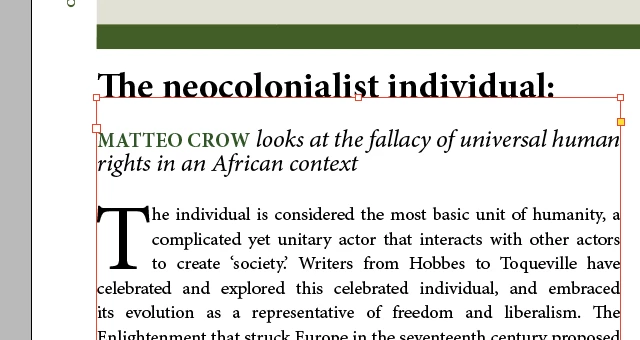
The settings of my text box (or something like that) is causing the first line of text to be aligned with the top line of the text box frame. I would like to have all text on the inside of the text box. How do I change this setting?

This is a print screen of what it looks like, and I want it to go back to normal, so that the title/first line is also on the inside of the box.
Correct answer Peter Spier

This could also be caused by setting the First Baseline in the Text Frame Options to Fixed in the dropdown and leaving the Min. Distance set on 0.

3 replies

Peter Spier
Community Expert
Peter SpierCommunity ExpertCorrect answer
Community Expert
November 2, 2016

This could also be caused by setting the First Baseline in the Text Frame Options to Fixed in the dropdown and leaving the Min. Distance set on 0.

betzyh
betzyhAuthor
Participant
November 2, 2016

Thanks! So what should I change the Min. Distance to if I want it to be normal/standard?

Peter Spier
Community Expert
Community Expert
November 2, 2016

In this case, at least the height of the ascenders (or you could choose one of the other options).

Inspiring
November 2, 2016

Is your baseline shift too set too high?

Willi Adelberger
Community Expert
Community Expert
November 2, 2016

Is the text on the stroke or it is a part of the whole story inside the frame?