

landscape_snarkitect
Known Participant
August 11, 2021
Answered

Text Showing Strikethrough

  • August 11, 2021
  • 3 replies
  • 1443 views

Hi,


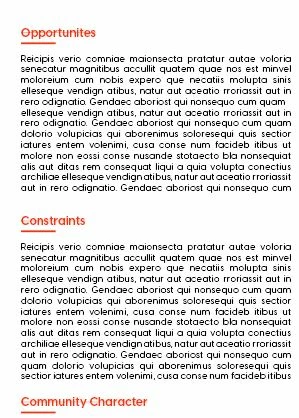
I just upgraded from CS6 to CC and my text is showing with a thin line through it. It does not appear that the font is missing or anything. Why might this be and how can I fix it? See image attached. It only seems to be certain headings. Thanks!
This topic has been closed for replies.
Correct answer Diane Burns

Yes, I missed the strikethrough, as mentioned, check that it's not applied. This can also sometimes occur when a character style is applied unknowingly, so make sure Character Styles are set to None. 

3 replies

Inspiring
August 12, 2021

Other than the rule below, it does appear as is the subheadings have a simple strikethrough through them. Check that the option below isn't selected.

Diane Burns
Diane BurnsCorrect answer
Inspiring
August 12, 2021

Yes, I missed the strikethrough, as mentioned, check that it's not applied. This can also sometimes occur when a character style is applied unknowingly, so make sure Character Styles are set to None. 

Diane Burns
Inspiring
August 11, 2021

Are you talking about the lines underneath the headings?

Sure looks like Paragraph Rules are applied. 

Check with Type Control Panel menu > Paragraph Rules.

But as Uwe says, best to see screen grab as he described.

Community Expert
August 11, 2021

Please do a screenshot with hidden characters and frame edges showing and zoomed in to 400% on the text where you see this. Select one character and show the Characters panel and the Control panel as well.


Thanks,
Uwe Laubender

( ACP )