

tpk1982
Legend
March 6, 2017
Answered

Text Thickness

  • March 6, 2017
  • 4 replies
  • 9325 views

Hello Everyone,

Is it possible to find the text thickness used in Indesign document? So far am using Pitstop for detecting those errors in PDF and it is also require some visual inspection.

I just want to know if it possible or not? I am thinking if i do outline all texts and check the thickness. But not sure i can achieve this,
Thanks,

K

This topic has been closed for replies.
Correct answer Trevor:

Thanks Trevor.. I'm keeping my fingers crossed


Hi Again,

I published a post on the script.

InDesign Thin Font Finder | Creative-Scripts.com

I'm not planning on regularly directing from the forum to my site for questions that I answer but in this case I think most that see the post there will agree it's appropriate.

Regards

HTH

Trevor

4 replies

Loic.Aigon
Legend
March 14, 2017

Dummy me

Loic.Aigon
Legend
March 14, 2017

You are so right but what about those who don't own a font editor and what about the users interested in a generic check

Jongware
Community Expert
Community Expert
March 14, 2017

Loic, shame on you for not thinking inside the box   You don't actually need a font editor (I could have mentioned that, but hey, what's a help forum without the occasional spoon feeding?).

Type the character of interest at 1000 pts. Measure the distance of interest. Divide by 1000. Now you have your multiplication factor, for that position, for any font size.

(You don't even literally have to use 1,000 pts exactly, as this will work for every possible size, which was my main point. But a lot of fonts have a one thousand units design size, and with good grid settings you will see the path points snap to 'logical' places inside the character.)

Community Expert
March 15, 2017

Hi Jongware,

the question is, if the task of meassuring can be automated somehow.

I see no way.* At least no fast and reliable way…

Wrapped my head around this problem. Took it as an intellectual challenge.

Also developed a hopefully sufficient substitute for path.shape (Adobe Illustrator) for InDesign that would require a lot of processing time and is far from perfect. And finally found an algorithm to get the center of an arbitary shape with InDesign scripting only. It is based on the solution Quertifly is pointing at with changing the stroke weight of a shape in Illustrator. But would that help?

* Maybe I see a way now while typing this:

It would require to do sections of the path and subpaths of a glyph to break down the problem to smaller pieces.
And inspect the smaller pieces one by one.

But here comes the next obstacle:

How can we break a shape like the "e" to substantial and handy parts?

Seems the whole operation would require a lot of processing time if that is possible at all.

Meassuring by "mouse" would be faster and more precise ;-)

Regards,
Uwe

Loic.Aigon
Legend
March 10, 2017

IF I remember well my high school mathematics, one possible algoritm would be to create outlines and then split the shape into a myriad of extra thin slices, as small as one can consider it's a rectangle. Then you could compute height of this shape to ensure about thickness. But I guess that in best cases, even a document made of one character would take ages to compute in ExtendScript.

Legend
March 10, 2017

Hi,

There is some stuff in the Plugin SDK about ink bounds, maybe that is what you are looking for. If you download the SDK search for  IWaxRunShape.

P.

Community Expert
March 6, 2017

Hi Kartik,

did you check Acrobat Pro's own Preflight capabilities?
There are some single preflight tests that are looking promising:

"Text uses artifical outline style"

"Text with stroked outlines"

From my Acrobat Pro DC on Mac OSX

( latest CC subscription version )

Regards,
Uwe

tpk1982
tpk1982Author
Legend
March 6, 2017

Hi Uwe,

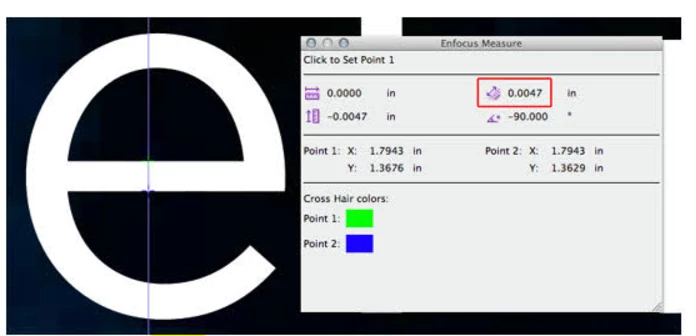
I am not looking for outlines text but i am looking for checking all text thickness if anything below 0.0047 inches.

So i thought if i do outline the texts in Indesign then i can able to check.. but not sure.

Regards,

Karthi

Loic.Aigon
Legend
March 6, 2017

Not sure it's achievable inside InDesign. Would keep on checking it with Prepress tools.

You may as well consider Enfocus Connect You which allows generating a PDF file on the fly while doing some PitStop Preflight.

So you could check for such issues in InDesign.

FWIW

Loic