64784228
Inspiring
October 24, 2022
Answered

Text Warp blue dot

  • October 24, 2022
  • 2 replies
  • 1344 views

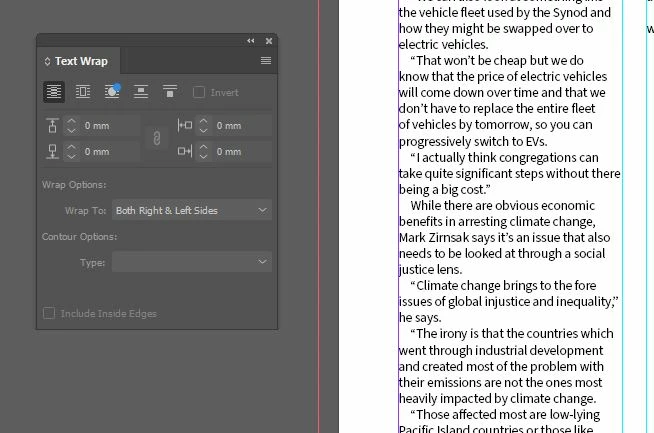
Whats going on here with the blue dot? Cant get rid of it and it's only appeared this morning. Anyone shed some light please.



This topic has been closed for replies.
Correct answer Peter Kahrel

The blue dot indicates a new or enhanced feature. In this case, the new feature is an addition to the contour options. Click the button and the blue dot will go away.

2 replies

Peter Kahrel
Community Expert
Peter KahrelCommunity ExpertCorrect answer
Community Expert
October 24, 2022

The blue dot indicates a new or enhanced feature. In this case, the new feature is an addition to the contour options. Click the button and the blue dot will go away.

Community Expert
October 24, 2022

Except it won't go away


Been like this for a while now... no idea why either 

Peter Kahrel
Community Expert
Community Expert
October 24, 2022

Maybe if you select a graphic so that the contour options can be shown in the dropdown?

Community Expert
October 24, 2022

Are you referring to the blue dot on the panel's icon? If so then I can see the same on my ancient InDesign version 16.4 so it seems that this exists for quite sometime. Is it bothering you or hampering some functionality in any way?

-Manan

-Manan
64784228
64784228Author
Inspiring
October 24, 2022

Hmmm. Must of just noticed it. Obviously missed my eyes for years.

Thanks for sorting it out.


Just read that Adobe wants us to pay for using the Pantone books...Now that sucks!

Community Expert
October 24, 2022
quote

Hmmm. Must of just noticed it. Obviously missed my eyes for years.

Thanks for sorting it out.


Just read that Adobe wants us to pay for using the Pantone books...Now that sucks!


By @64784228


The Blue Dot is just part of the Icon I would imagine to differentiate from the other similar function in the Text Wrap panel.


And no - Adobe doesn't want you to pay for Pantone ------------>>>>> Pantone wants you to pay for Pantone. 

The terms of the license agreement has changed and nothing Adobe can do about it.


You can still use Pantones from previous documents by loading the colours or copying and pasting. 

Adobe Bridge can also find documents using specific colours. 

Even if a PDF or something else has Spot colour that you need - you can place that document then delete the placed file and the swatch will be loaded in the document.