

Known Participant
December 13, 2016
Answered

Text wrap in Indesign pdf forms

  • December 13, 2016
  • 2 replies
  • 5988 views

How do make the text to wrap -in the text fields- when i create an interactive pdf form using Indesign CS6?

This topic has been closed for replies.
Correct answer Derek Cross

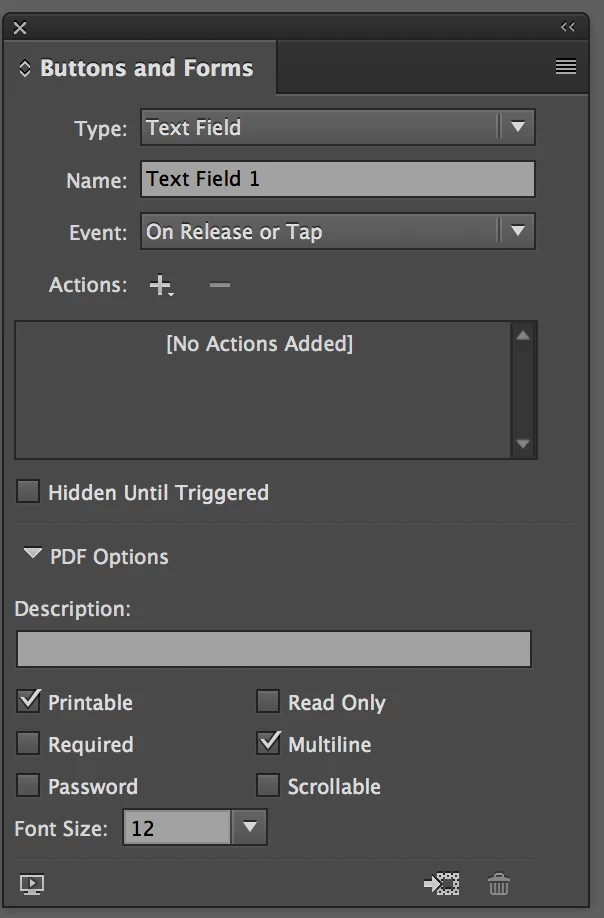
You can tick Multiline in the Buttons and Form dialogue box in InDesign, and you can also do it in Acrobat. (You have to set the size of the text box to be large enough for more than one line!)
2 replies

Mike Witherell
Community Expert
Community Expert
December 13, 2016

No, it doesn't.

Mike Witherell
melaniemccrae
Participant
August 8, 2023

Hi,

I am trying to create an online form from Indesign, but with boxes like the screenshot below. I tried creating a table so that each letter/number that is typed in the form is in its own block, but it doesn't work. PLEASE HELP.

Derek Cross
Community Expert
Derek CrossCommunity ExpertCorrect answer
Community Expert
December 13, 2016

You can tick Multiline in the Buttons and Form dialogue box in InDesign, and you can also do it in Acrobat. (You have to set the size of the text box to be large enough for more than one line!)

genikAuthor
Known Participant
December 13, 2016

Thanks Derek, my i also ask (cause u seem to be "the guru" :-)  ) how do i center text on the text field? All text seems to be positioned left, in my case i want to be able to align it center, is it possible?

Mike Witherell
Community Expert
Community Expert
December 13, 2016

In Acrobat, within Form editing, double-click a form field to get to Text Field properties; go to the 4th tab called Options; and the first drop-down box is Alignment where you can choose Center.

Mike Witherell