

wmrowen
Known Participant
November 12, 2019
Question

text wrap smaller than entered

  • November 12, 2019
  • 2 replies
  • 796 views

For months now I have found that text wrap amount entered is frequently less than entered. And not uniformly in the same document with different items.
I just entered ridiculously larger amounts to get it to be right but it's not really how it should. I recognize I may have "shot myself in the foot" in some other entry though so please help me re-aim.

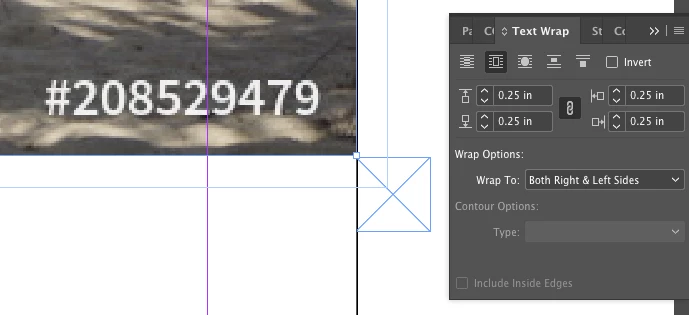
Screenshot  @315% shows how the text wrap is set for .25" and the the Rectangle frame is also drawn as a .25" square—they are not the same:
Thanks!

This topic has been closed for replies.

2 replies

Community Expert
November 13, 2019

Hi,

the Transform Panel can be opened from:

Window > Object & Layout > Transform

https://helpx.adobe.com/indesign/using/transforming-objects.html


Regards,
Uwe Laubender

( ACP )


Community Expert
November 12, 2019

Hi,

it's because your frame with the text wrap was scaled when preferences for scaling were set to: Adjust Scaling Percentage.

General > Object Editing > When Scaling: [ x ] Adjust Scaling Percentage


I can demonstrate this with two objects on the page with the same text wrap value, 10 mm, but effectively with two different text wraps. The left item was scaled to 120% with: When Scaling: [ x ] Adjust Scaling Percentage, the other one to the right isn't scaled at all so the scaling applied is 100%.


From my German InDesign showing the Textwrap Panel with a distinct value for text wrap at the top:


The scaling of the right object is 120%. Therefore the effective value for the wrap is 12 mm. Not the 10 mm you are seeing for both rectangles:


In contrast the object on the right is not scaled. Textwrap is not scaled:


What can you do?

Select your frame and check with your Transformation Panel the actual scaling value.

If the value is not 100 % you could re-define the transformation as 100 % :


Here the result:


Regards,
Uwe Laubender

( ACP )

wmrowen
wmrowenAuthor
Known Participant
November 13, 2019

Thanks Uwe for going to so much trouble! 🙂
I went to Indesign > Preferences > General > Object Editing as you said and indeed Adjust Scaling Percentage was selected (1st screenshot) and so on selecting Apply To Content instead, I see both Include Stroke Weight and Include Effects are checked. My intuition was that neither should be or am I wrong?


I could never find the extra menu in what in the US version is called Properties/Transform most such menus have a menu of additional options (4 horizontal bars icon to click) as your German version does but Properties doesn't:

But perhaps I will stumble into it. 🙂