
Participant
March 26, 2024
Question

Textframe "anchor mark" invisible when created by InDesign Server

  • March 26, 2024
  • 4 replies
  • 944 views

Hello,


we encountered a weird glitch when creating documents by InDesign server that contain anchored textframes.

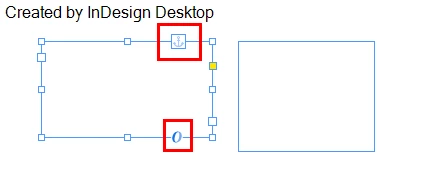
The textframes get created and anchored, but when opening the file in InDesign Desktop afterwards and selecting the frame, the "anchor mark" is invisible. Same for the "red square" when the frame is not anchored.


However, when creating the same file in InDesign desktop, the "marks" are visible.


Here is a little reproduction script (NOTE: I created a blank InDesign file beforehand to open it with this script):

var currentDoc = app.open(new File("path/to/file"));

var objParentTextFrame = currentDoc.textFrames.add();

var objInsertionPoint = objParentTextFrame.insertionPoints[0];

var objAnchoredTextFrame = objInsertionPoint.textFrames.add();
objAnchoredTextFrame.anchoredObjectSettings.anchoredPosition = AnchorPosition.ANCHORED;

currentDoc.close(SaveOptions.YES, new File(jobFolder + "/path/to/saved/file"));


Here the result when created by InDesign Desktop:
 

And here the result when created by InDesign server:
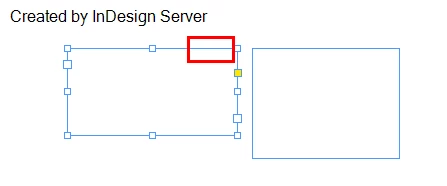
 

The "missing marks" are specific to the created textframes. When creating a new textframe with the Desktop version in the file that was modified by the server version, the result is the same as in the first screenshot (the marks are visible on that textframe).


Has anyone an idea why this happens in InDesign server and is there a way to fix it?


Thank you very much,

Dean


4 replies

Alo Lohrii
Participating Frequently
September 23, 2025

Hi everyone,


Anchored objects created in IDS will now show as an anchored adornment icon when the document is opened in InDesign desktop. This is a new feature which was previously unavailable, now available in pre-release build 21.0.0.169 onwards, please try it out and let us know your feedback https://www.adobeprerelease.com/beta/D1A76A97-F7DC-4552-DE3C-FF5F211C7492


Lohrii
Adobe Developer Programs

Alo Lohrii
Participating Frequently
June 12, 2024

This is a known issue, an internal bug #ID-4249675 is under review with InDesign team

Participant
June 12, 2024

Hello Alo,


thanks for your response. Is there any timeframe when a fix will be available?


- Dean

Participant
June 10, 2024

Hi everyone,


if an InDesign template is processed on an Adobe InDesign Server and then opened in a locally installed InDesign, then the control element for anchored objects (little blue square) is missing on the top of the container of all anchored objects.
The option "show anchored object control" in the InDesign application is enabled, but not shown on any anchored object, that is generated on the InDesign Server.
if I create manually a new frame in this document, the anchored object control appears there.

Only after exporting the document as IDML and reopening the file shows the anchored object control on all frames.
(InDesign Server DOM doesn't offer the property "app.generalPreferences.showAnchorObjectAdornment = true". This property is only availlable by script in local installed InDesign application).
Is this an known issue?


Community Expert
June 12, 2024

I could not find this mentioned on the forum or https://indesign.uservoice.com/forums/601021-adobe-indesign-feature-requests

Did you try to isolate the problem? Maybe just use a very small script that does just enough to repro the issue and then check the document so produced on multiple machines and different versions if InDesign. After doing so you would have a presentable case that can be filed as a bug at the link I gave above.

-Manan

-Manan
m1b
Community Expert
Community Expert
March 26, 2024

I don't have Indesign Server to test but I wonder if those two text frames are different in some way, perhaps due to the Server installation having different default settings for anchored objects or something. Have you looked at both carefully in the debugger? In VSCode I often expand the object in the console and right-click and choose "copy all" and paste into a new document then do same for the other text frame, and finally do a compare by selecting both dumps in the explorer panel and choosing "compare". 
- Mark

Participant
March 27, 2024

Hi m1b,


thank you for your answer. I tried to compare both objects like you described. For that, I expanded the object and expanded each direct child element of that object in VSCode Debug Console. Then i compared both dumps.


Except different Ids and "story names", I found the following differences:


Property "parent.kinsokuSet" and "parentStory.kinsokuSet":

  • The file created by desktop has the value "NOTHING"
  • The file created by server has the value "HARD_KINSOKU"


Property "parent.mojikumi" and "parentStory.mojikumi":

  • The file created by desktop has the value "NOTHING"
  • The file created by server has the value "LINE_END_ALL_ONE_HALF_EM_ENUM"


From a quick search at https://www.indesignjs.de/extendscriptAPI/indesign-latest/ both are related to the japanese language. The InDesign server is installed with the english language, the Desktop with the german language.


I changed the properties in the textframe created by the server, to have the same values as the textframe created by the desktop, but that did not fix the issue.


What I also discovered: When I open the file created by the server in the desktop version, export it as idml and open that idml, the text frame has the "anchor mark" (I guess because the idml is created by the desktop version?).


Do you have any other idea I could try?

If helpful, I could post the dumps or the InDesign files itself.


Thank you for your help,

Dean