
Participating Frequently
February 13, 2018
Answered

textFrames.contents changes my text (or just removes special characters)

  • February 13, 2018
  • 1 reply
  • 1102 views

Hi.

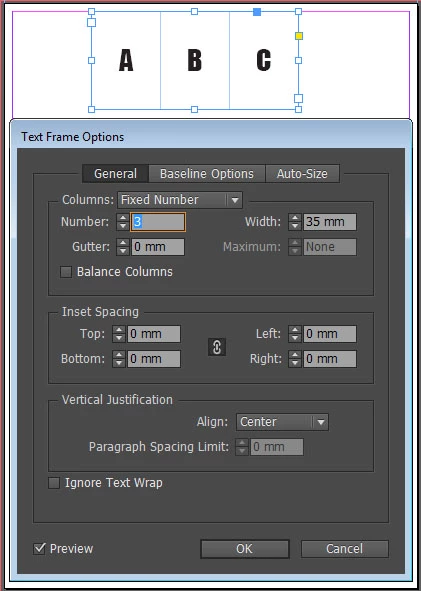
I have a page with a single text frame. This frame has 3 columns with text in each column.
Now, I duplicate that frame and replace its text, just to make the change more apparent.
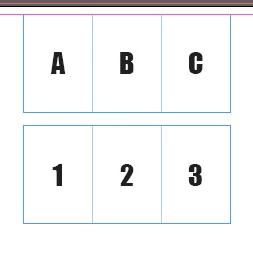
If I now read the content of any of them, I get the exact text. But if I try to set text, I get a problem. My special characters are removed.

Since my script is working with auto page numbers, I found a workaround with charCodeAt(i). But I cannot workaround the InDesign's appetite for my column breaks as well.

If I run this simple script, my column breaks are gone. Why?

app.activeDocument.pages[0].textFrames[0].contents = app.activeDocument.pages[0].textFrames[1].contents;
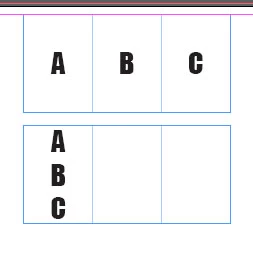
For some reason, this (the simplest of operations) doesn't make an exact copy. I can read the correct value (with special characters) from the text frame, I can store it in a variable, I can alert it, but I cannot set it to another text frame using 'contents'. I lose column breaks.

Splice would work wonders, but it doesn't work on strings in Adobe's version of JavaScript.

Any ideas?

I believe Grep won't work for me since I have too many copies of many objects.

This topic has been closed for replies.
Correct answer Laubender

Hi,

if you need special characters in a text you should use special characters.

// Just for illustration:

var story = app.activeDocument.pages[0].textFrames[0].parentStory;

story.insertionPoints[0].contents = "A";

story.insertionPoints[1].contents = SpecialCharacters.COLUMN_BREAK;

story.insertionPoints[2].contents = "B";

story.insertionPoints[3].contents = SpecialCharacters.COLUMN_BREAK;

story.insertionPoints[4].contents = "C";

Or if the story already contains "A", "B", "C" with a special character between "A" / "B" and "B" / "C" and you want to change the contents to "1", "2" and "3" without removing the column breaks:

var story = app.activeDocument.pages[0].textFrames[0].parentStory;

story.characters[0].contents = "1";

story.characters[2].contents = "2";

story.characters[4].contents = "3";

Regards,
Uwe

1 reply

Jongware
Community Expert
Community Expert
February 13, 2018

".contents" is an interface to plain old JavaScript and always converts InDesign's native (complex!) text to boring flat strings. The right property to use is ".texts[0]" – yes, it's an array, and it always has one element. You cannot 'assign' one complex object to another, but there is a text function ".duplicate". Does that help you?

Savage_VsAuthor
Participating Frequently
February 13, 2018

I use duplicate function to create the copies of my object. Then I need to make changes to the text.

I see that texts is a read-only property, but it doesn't return a string for me.

alert(app.activeDocument.pages[0].textFrames[0].texts[0]);

returns "[object Text]". And

app.activeDocument.pages[0].textFrames[0].texts[0] = app.activeDocument.pages[0].textFrames[1].texts[0];

makes no changes at all. Could this even help me since it is read only?

I see now that my problem is unwanted conversion from column breaks to paragraph breaks.

EDIT:

Just tried:

app.activeDocument.pages[0].textFrames[0].texts[0].contents = app.activeDocument.pages[0].textFrames[1].texts[0].contents;

Same as original post.

LaubenderCommunity ExpertCorrect answer
Community Expert
February 14, 2018

Hi,

if you need special characters in a text you should use special characters.

// Just for illustration:

var story = app.activeDocument.pages[0].textFrames[0].parentStory;

story.insertionPoints[0].contents = "A";

story.insertionPoints[1].contents = SpecialCharacters.COLUMN_BREAK;

story.insertionPoints[2].contents = "B";

story.insertionPoints[3].contents = SpecialCharacters.COLUMN_BREAK;

story.insertionPoints[4].contents = "C";

Or if the story already contains "A", "B", "C" with a special character between "A" / "B" and "B" / "C" and you want to change the contents to "1", "2" and "3" without removing the column breaks:

var story = app.activeDocument.pages[0].textFrames[0].parentStory;

story.characters[0].contents = "1";

story.characters[2].contents = "2";

story.characters[4].contents = "3";

Regards,
Uwe