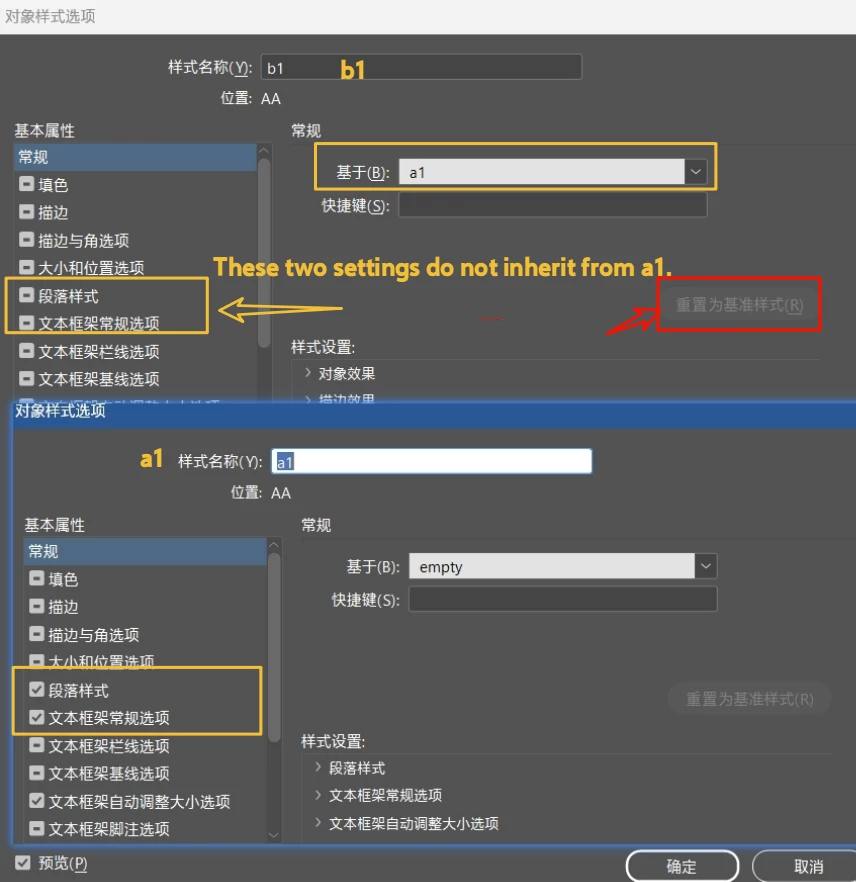
Answered
Hi @dublove here is a function to do the "Reset to Base".
- Mark
/**
* @file Reset Object Style.js
*
* Equivalent of clicking the "Reset To Base" button
* in the Object Style Options dialog box..
*
* @author m1b
* @version 2025-10-09
* @discussion https://community.adobe.com/t5/indesign-discussions/how-to-create-new-object-styles-based-on-really-quot-none-quot-object-using-scripts/m-p/15412503
*/
function main() {
var doc = app.activeDocument;
var myTestStyle = doc.objectStyles.itemByName('Test');
// reset the style to its base style
resetObjectStyle(myTestStyle);
};
app.doScript(main, ScriptLanguage.JAVASCRIPT, undefined, UndoModes.ENTIRE_SCRIPT, 'Reset Object Style');
/**
* Resets the object style to its base style.
* @author m1b
* @version 2025-10-09
* @param {ObjectStyle} style - the style to reset.
*/
function resetObjectStyle(style) {
var baseStyle = style.basedOn;
if (!baseStyle.isValid)
return alert('Object style cannot be reset due to missing base style.');
style.properties = baseStyle.properties;
style.contentEffectsEnablingSettings.properties = baseStyle.contentEffectsEnablingSettings.properties;
style.objectEffectsEnablingSettings.properties = baseStyle.objectEffectsEnablingSettings.properties;
style.basedOn = baseStyle;
};Sign up
Already have an account? Login
To post, reply, or follow discussions, please sign in with your Adobe ID.
Sign inSign in to Adobe Community
To post, reply, or follow discussions, please sign in with your Adobe ID.
Sign inEnter your E-mail address. We'll send you an e-mail with instructions to reset your password.