


cited89426582
Participating Frequently
April 25, 2024
Answered

The EPUB footnotes have been changed in a strange way

  • April 25, 2024
  • 7 replies
  • 3994 views

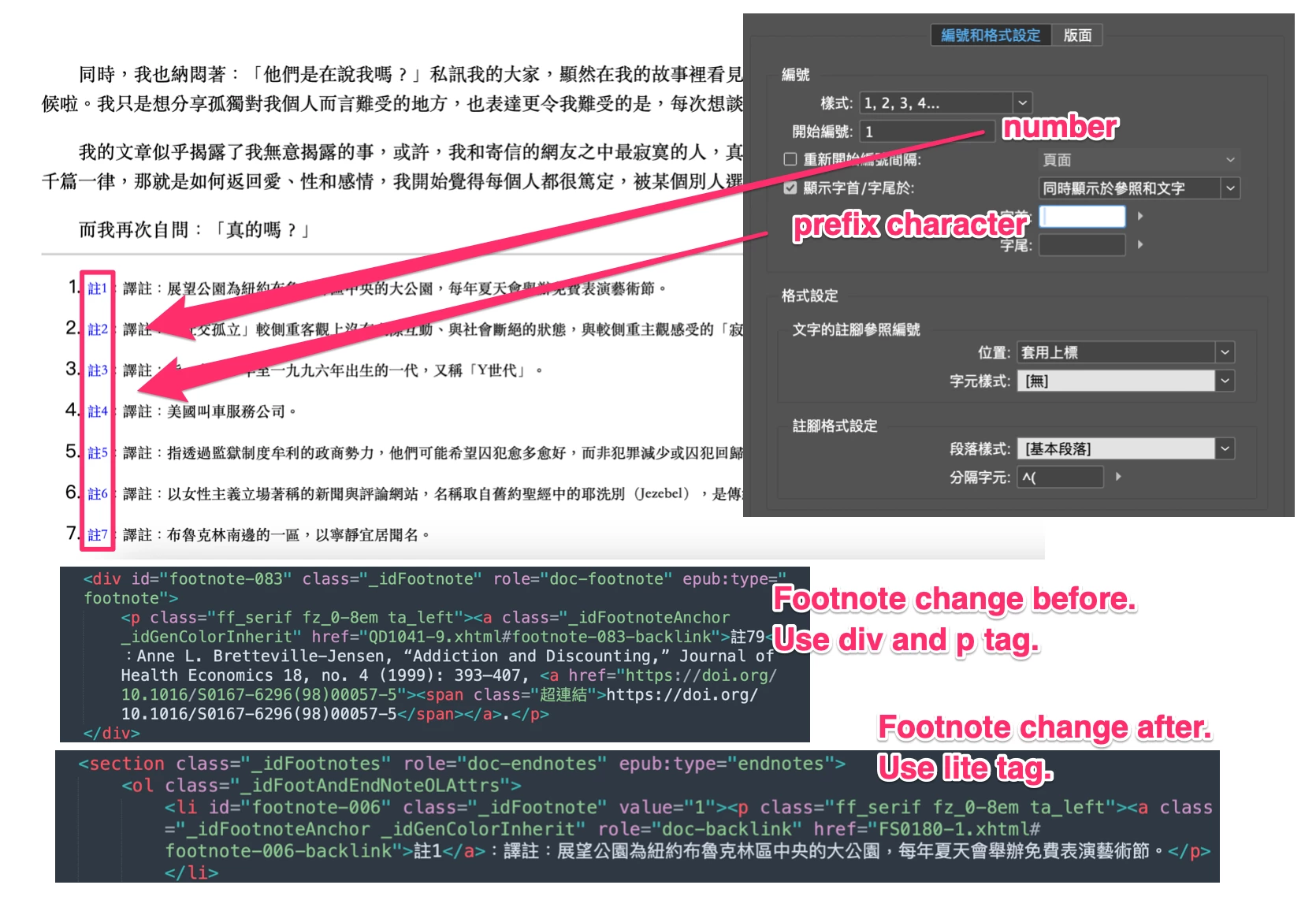
After the recent update to InDesign 19.4, I noticed some changes made to how InDesign handles footnotes for EPUBs. Previously, it used a <div> with <p> for footnotes, which worked fine. However, they've now switched to using a <list>, which is causing issues.

This change completely overlooked that InDesign footnotes also have numbering and preceding characters. As a result, the output is quite ridiculous. Of course, I can fix this by changing the list-style to none in the _idFootAndEndNoteOLAttrs style, but the update mentioned, "Version 19.4 provides fixes for important functional, stability, and performance issues," yet the EPUB part seems to be a mess... I don't know what to say.

I'm using the Traditional Chinese environment, and I'm not sure if other language versions of InDesign 19.4 have similar issues.
This topic has been closed for replies.
Correct answer PETER DE GREEF

quick fix would be to add this to your generated css file:


li._idFootnote {
list-style-type:none;
}

7 replies

Participant
July 31, 2024

As for me - I do not want my footnotes to be a list, so I change all the <li> back to <div>. Also the role=doc-backlink code is tagged as an error in my validator, so I have to delete it everywhere.  It is a nuisance.  I would really appreciate if Adobe could bring back the old conversion method it gave me better Epubs with fewer issues to repair in the coding.


James Gifford—NitroPress
Legend
July 31, 2024

You're free to modify the EPUB as you see fit, of course, and you may have to for certain legacy uses and readers... at least, for a time.


I don't think the change is some accident or whim of Adobe's, but a deliberate evolution of the EPUB implemeentation accommodating the new accessibility requirements. The problem with EPUB is that it's an unenforced standard, so if some players change their app to be consistent with new standards, all other apps and tools and readers and so forth are left out of step. Over time, some majority of tools conform, and we move forward with a mixed bag of elements that mostly work together again.


If you are having production or distribution problems with the new model, you can hack the output to conform to the prior model, or start looking for replacement tools that have moved forward in step with Adobe.

PETER DE GREEFCorrect answer
Participant
May 13, 2024

quick fix would be to add this to your generated css file:


li._idFootnote {
list-style-type:none;
}

James Gifford—NitroPress
Legend
May 13, 2024

Yes, that was already mentioned. Both as an addendum to the export... and as appearing in the original export CSS.


The faults and fixes here are by no means clear. Something subtle is wrong with list export in v19.4, and it seems to vary greatly for each user.

James Gifford—NitroPress
Legend
May 3, 2024

Testing Summary 3 Mar 2024 — ID v19.4, Win11


Okay, I've run several tests on footnotes and endnotes under v19.4, and the short version is that while the internal structure has been changed (from <p> elements to <ol>/<li> elements)... it all works exactly as it should under all conditions I can check—


  • I can set any footnote/endnote numbering options, and they pass through to the exported EPUB. This includes numbering type, starting number, location etc.
  • I see no duplicate numbering in either note list.
  • EPUBcheck passes the result without a single warning.
  • Ace passes the result with no relevant warnings (a few correctable ones related to the TOC).


Since this new system all turns on an ordered (numbered) list that then has the numbering suppressed (an approach which I cannot decide is a hack, a straightforward use of cascading style control or a brilliant workaround), and it was noted that adding the number-suppression statement fixed things for at least one user, I have to conclude—


  • There may be some faulty versions of 19.4 that did not include the number-suppression statement; the solution is to look at the exported CSS file for that _idFootAndEndNoteOLAttrs { list-style: none; } statement.
  • If that statement is present, check that it is applied to the <ol> list structures for footnotes and endnotes;
  • If the duplicate numbers are being seen in any one EPUB reader, check the file in a standard/vanilla one such as Calibre, Thorium or Kindle Previewer.


Other than that, any fault may be in original source material and setup. The file I tested was created for other purposes before v19.4, but when I made some of the testing changes I had a sense that something global might have changed. If the source files in question are long-existing, it may be worth resetting or re-formatting both foot and end notes to force some internal structural update that results in a more compliant export.


So, TL;DR... there does not seem to be a problem here. If anyone is still seeing faults in the footnote/endnote export process, or in their accessability, feel free to continue the discussion but with as many details of the versions, doc, faults, validation and accessibility checks, readers used, etc. It won't help to just say "I'm still seeing the problem." 🙂

Participating Frequently
April 30, 2024

Out of the box, InDesign 19.4 is not suitable for epub footnotes and does unexpected things. It looks like it works for epub3, but only if you use the "popup" placement. You get an 'aside' paragraph. Well, maybe that's fine... 

But when you export it as normal footnotes, InDesign treats it as 'ol and li' text. And put an extra number in front of it and give a 'value' to the list - which no one wants, because you're choose our own values (fixed figures) in the InDesign footnote settings. That value is the link from note to note anchor - so it is he only number that counts.

When exporting to epub2 the same things happen.
Did they ever test this before launching?

The solution is, I think: to put a line in the CSS with:
ol {list-style-type: none} or more specifically an 'ol' only in the section 'notes'.
Hopefully, e-readers will recognize these CSS declarations.

Am I right? Or are there more settings we can use?

James Gifford—NitroPress
Legend
April 30, 2024

Handling of foot- and endnotes is 100% reader-dependent. Even if you apply the few feeble controlling options, any reader and any user settings can override them.


I am still not able to replicate the 'list item' format being reported, and suspect it's some subset of how notes are formatted, numbered etc. within ID. A selection of those seeing the change posting their end/footnote setup menus might help sort things out.


Strike that; for whatever reason, my exports now create <ol> entities for both footnotes and endnotes. So, definitely a change; how this affects, and is meant to affect accessibility, I have no idea. I can't believe it's a random or un-thought change, though  — my money would be on a misunderstanding somewhere or an incomplete implementation.

James Gifford—NitroPress
Legend
April 30, 2024

Test exports with both types of notes pass EPUBcheck without a single warning.


Ace shows some violations, entirely in the content.opf file.


Am I missing something? I cop to being only slightly familiar with formal accessibility requirements.

Inspiring
April 30, 2024

The exact same thing has happened to me, except I didn't know how to fix it. It appears to happen because of the new accessiblity functions for EPUB in 19.4. For those more technically minded than me, you can read more about the development of the new features here: https://github.com/ways2read/InDesignA11Y/issues/3


Hopefully these issues will be fixed sooner rather than later.

James Gifford—NitroPress
Legend
April 25, 2024

I'd have to experiment (with the western English version), but that doesn't sound right. I typically use workarounds for footnotes, since few readers handle them well, but I don't recall them ever being structured as lists.


After a quick check, I can confirm that v19.4 is exporting footnotes as it always has, with the <div>/<p> structure... in a reflowable export, at least.

HARSHIKA_VERMA
Community Manager
Community Manager
April 25, 2024

Hi @cited89426582,

We are sorry to hear about the issue. Would you mind telling us if it's happening with all files or with this specific file? Does that happen with other language as well? Is it possible for you to share the file with us for investigation? If yes, please share the file with me over a private message so that we can check at our end.


We will try our best to help.


Thanks,

Harshika

Participant
May 2, 2024

Any further updates on this issue? Thanks.

James Gifford—NitroPress
Legend
May 2, 2024

What precisely is the issue?


I confirmed (after some mixed results) that v19.4 is indeed using a different structure for footnotes and endnotes — as noted, the HTML list model instead of grouped paragraphs.


However, this passes EPUBcheck without a hiccup, and does not seem to bother Ace, either.


What issue do you see as needing further resolution?


(I am assuming this change was made in concert with, and with the approval of, the other accessibility changes noted in other topics. If it's in conflict with accessibility, Ace doesn't seem to mind and I've seen no other claims.)