

Inspiring
July 10, 2026
Question

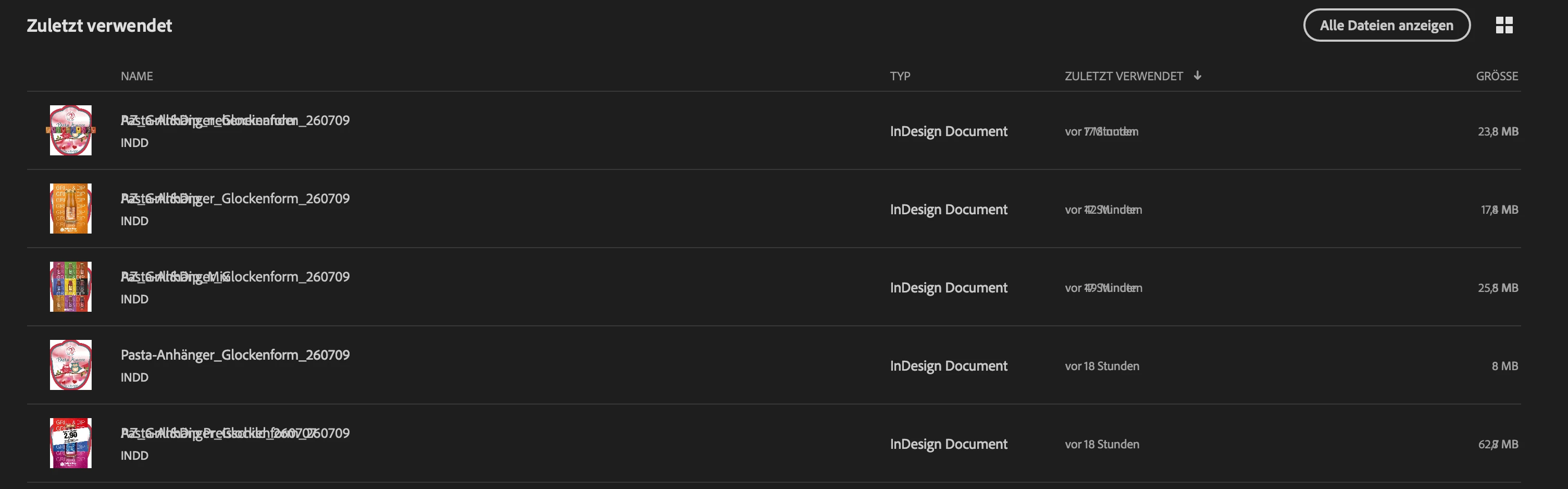
The File names are not readable in "Open recent" at Indesign 21.4.1

  • July 10, 2026
  • 5 replies
  • 42 views

Why I can’t report a Bug in the Indesign Community?

The names in the “open recent” menu are not readable. the are lay over by other letters.
Indesign 21.4.1 on MacOS 26.5.1


    5 replies

    Barb Binder
    Community Expert
    Community Expert
    July 17, 2026

    Why I can’t report a Bug in the Indesign Community?
     

    Two ways to report a bug:

    ~Barb at Rocky Mountain Training
    nik.m
    Community Manager
    Community Manager
    July 17, 2026

    Hi ​@Matthias.G.ermany, just following up to see if you were able to find a solution for the Open Recent menu using the steps suggested here?

    If not, please let us know and we’ll be happy to help further. 


    Thanks, 

    Nikunj 

    Bill Silbert
    Community Expert
    Community Expert
    July 10, 2026

    Problems within the interface can usually be fixed by deleting your InDesign cache files. This is not the same as deleting preferences which Abhishek has already suggested.

    To delete cache files:

    For Macintosh Users: The User Library folder in which InDesign’s cache files are stored is hidden by default on most Macintoshes. To access it make sure that InDesign is closed and click on the desktop to launch a Finder Window (Command-N). With this window in column view follow the path User>Home folder (it’s the folder with an icon that looks like a house—it may have the user’s name rather than “Home”) and click on the Home folder. With the Option Key pressed choose Library from the Finder Go Menu. “Library” will now appear within the Home folder. Within the Library folder find the “Caches” folder. Within the Caches folder find and delete the entire folder “Adobe InDesign”. I find that deleting the InDesign cache folder completely leads to a lasting change.

    For Windows Users: On Windows 7 and above the caches files are hidden. To find them go to the Control Panel and open Folder Options and then click the View tab. Then select “Show hidden files and folders” or “Show hidden files, folders or drive options” in Advanced Settings. Then delete (or rename) the folder at the end of this path: C:\Users\[User Name]\AppData\Local\Adobe\InDesign\Version [#]\<Language>\Cache.

    Abhishek Rao
    Community Manager
    Community Manager
    July 10, 2026

    Hi ​@Matthias.G.ermany,


    Thank you for reporting this, and sorry you're running into this display issue. Could you please confirm if the overlapping file names are still visible after restarting InDesign or restarting your Mac? Also, let us know if this behavior is limited to the Recent Files screen or if you also see it under File > Open.

    If the issue persists, please try resetting your workspace by going to Window > Workspace > Reset Essentials (or reset your current workspace): https://helpx.adobe.com/indesign/desktop/get-started/settings-and-preferences/create-and-manage-workspaces.html. If that doesn't help, please manually reset your InDesign preferences by following the video at the bottom of this page: https://helpx.adobe.com/indesign/using/setting-preferences.html.

    If you're still seeing the same behavior afterward, could you also test it from a new macOS user account to help determine whether the issue is related to your current user profile. Ref: https://support.apple.com/guide/mac-help/mh15191/mac.


    Please let us know how it goes, and we'll be happy to continue investigating with you.

    Abhishek

    Abhishek Rao
    Community Manager
    Community Manager
    July 17, 2026

    Hi ​@Matthias.G.ermany,


    I just wanted to follow up and see if you've had a chance to try the suggested troubleshooting steps. Are you still seeing the overlapping file names in the Open Recent menu?

    As ​@Barb Binder mentioned, if you believe this is a bug, you can also report it on UserVoice:
    https://indesign.uservoice.com

    If the issue still persists, please share the requested information here as well. I'd be happy to investigate it further and, if necessary, escalate it to the product team. Also, if you've already created a UserVoice report, please share the link in this thread so we can track it as part of the investigation.


    Looking forward to your update.

    Abhishek

    Community Expert
    July 10, 2026

    I have experienced this as well but if it remember it correctly this comes and goes by itself.

    -Manan
