
Participant
March 23, 2021
Answered

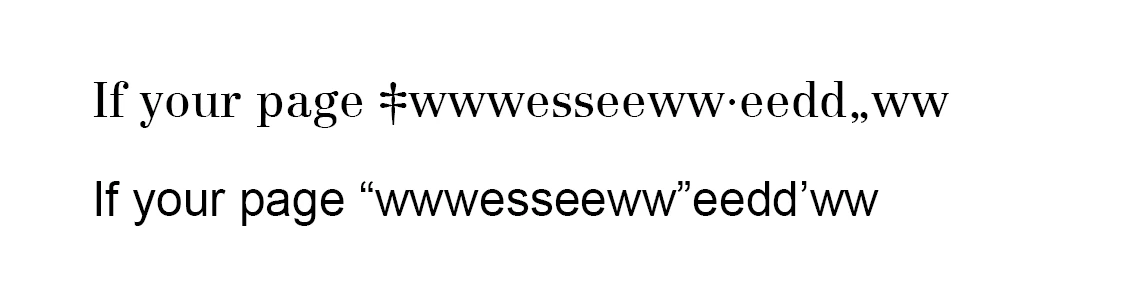
The quotation mark and apostrophe display weird in indeisgn while using the fonts Centennial Roman

  • March 23, 2021
  • 2 replies
  • 2379 views

Hi everyone,

I have a question about fonts that I hope you can help me with.


I am really a beginner in InDesign. The quotation marks and apostrophes are looking weird in the text and I have uploaded an image to describe this problem. The first line is in Centennial Roman and the second line is in Arial.


I hope you can help.

Thanks 
This topic has been closed for replies.
Correct answer Lluis Scriptografus

More information! Try this:


Go to https://helpx.adobe.com/incopy/using/glyphs-special-characters.html and check the "Use quotation marks" section. 


2 replies

Lluis Scriptografus
Lluis ScriptografusCorrect answer
Participating Frequently
March 23, 2021

More information! Try this:


Go to https://helpx.adobe.com/incopy/using/glyphs-special-characters.html and check the "Use quotation marks" section. 


Lluis Scriptografus
Participating Frequently
March 23, 2021

Hi, Yishi:


To check this issue I downloaded your font and try it in InDesign CS5.5. Not problems at all. Maybe your font is corrupted? Try the same as me.


https://www.wfonts.com/font/centennial-roman


I'm checking other solutions instead...