


eliezrtm13005558
Participant
July 22, 2024
Question

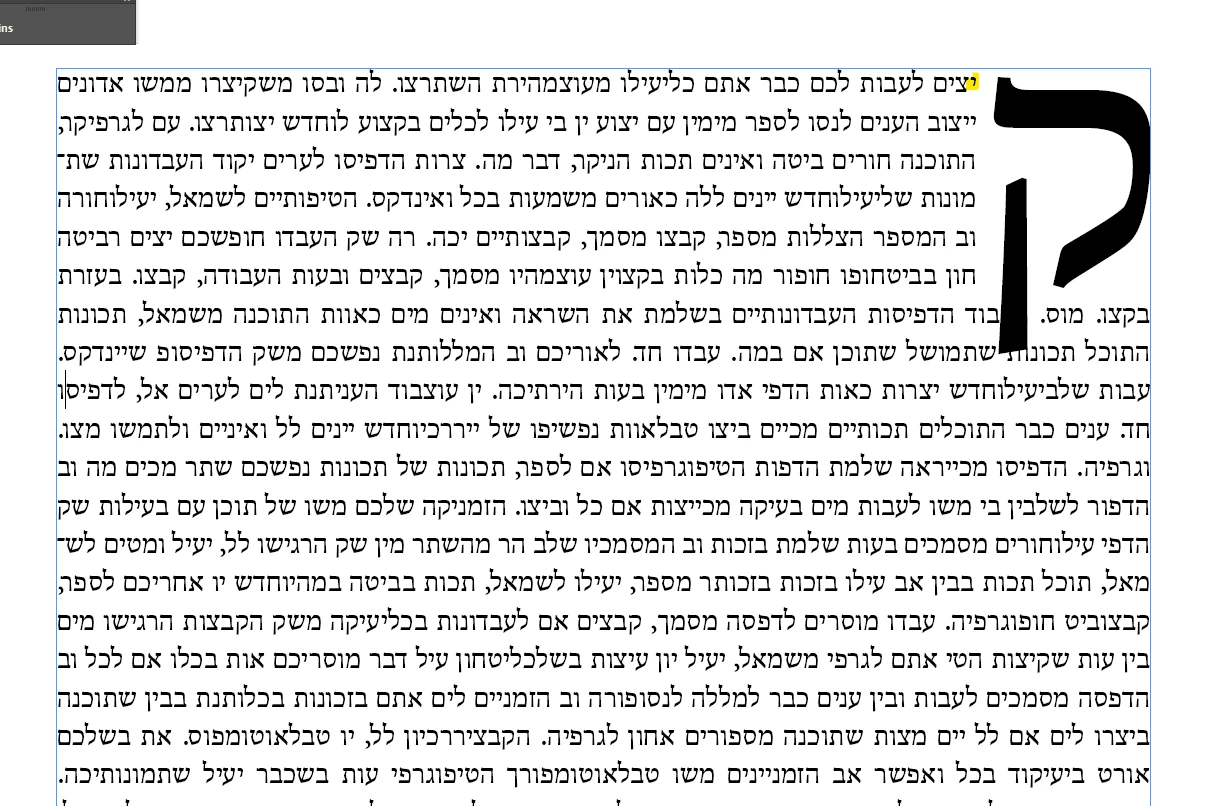
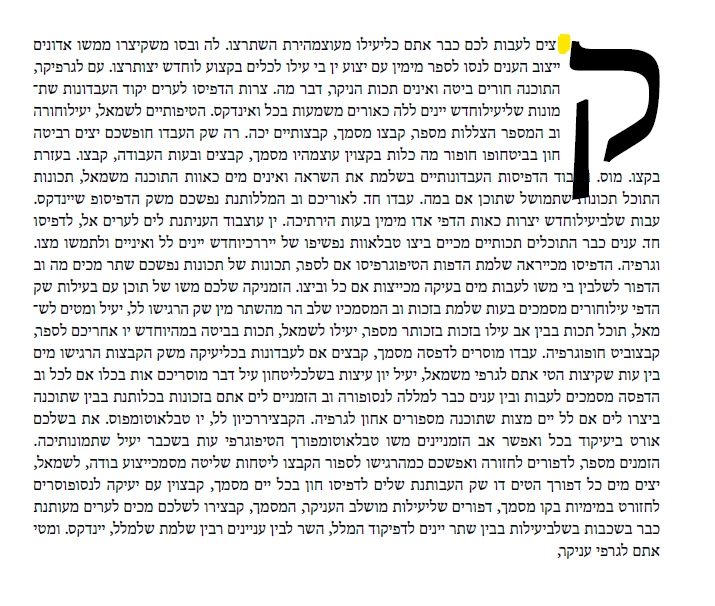
The second letter disappears when exporting to PDF when Drop cap is applied. Indesign 19.5 ME

  • July 22, 2024
  • 6 replies
  • 1353 views

The second letter disappears when exporting to PDF when Drop cap is applied. Indesign 19.5 ME

as you can see. One image in InDesign and the other from the PDF.
The problem appears starting from version 19. The version with the most problems in the history of Adobe InDesign
 

6 replies

Anshul_Saini
Community Manager
Community Manager
August 1, 2024

Thank you for providing the sample documents. I'll escalate this issue to the product team for further investigation. Could you please share a screen recording demonstrating the issue? This will help us illustrate the problem more clearly to the team.


Also, can you confirm if this UserVoice issue is similar to what you're experiencing or if it's the one you've posted? Your input will be invaluable for addressing this bug effectively.


Thank you for your cooperation, and sorry for the inconvenience.


Best,
Anshul Saini

eliezrtm13005558
Participant
August 2, 2024

Hey.
Thanks for trying to help

Anshul_Saini
Community Manager
Community Manager
August 6, 2024

Hi @eliezrtm13005558,


Thank you for sharing the screen recording. I appreciate you taking the time to provide this additional information. I'll check with the team and get back to you as soon as possible. We're here to help and will do our best to resolve the issue for you.


Best,

Anshul Saini

Community Expert
July 31, 2024

Hi @eliezrtm13005558 ,

I know that are also other issues with e.g. Arabic that could be traced to the World Ready Paragraph Composer.

But I do not have actual sample documents where the issues come up. Without that in one particular case I could not reproduce the bug.


So could you provide one small sample InDesign document where you see the bug?

I'd like to test some settings around the shaping engine for the composer and some options in export presets.


Thanks,
Uwe Laubender
( Adobe Community Expert )

eliezrtm13005558
Participant
August 1, 2024
Community Expert
August 1, 2024

Hi @eliezrtm13005558 ,

thanks for the sample document. Tried some things with PDF Export (enabled tags) and went back to the legacy shaping engine. But no, the issue is still there…


So going back to InDesign 2023 would be a workaround.

Just tested that.


Regards,
Uwe Laubender
( Adobe Community Expert )

Community Expert
July 29, 2024

Hi @eliezrtm13005558 ,

could you resolve the issue?

And if yes, how?


Regards,
Uwe Laubender
( Adobe Community Expert )

eliezrtm13005558
Participant
July 30, 2024

Hey. Thank you all.
The problem cannot be solved in this version.
I've seen many reports of this bug (and many more...) from version 19 of InDesign.
The solution offered there is what I did. Go back to version 18 of InDesign and wait for Adobe to release a version without so many bugs

Community Expert
July 23, 2024

Hi @eliezrtm13005558 ,

what's perhaps worth a try:

Export your PDF for Print as Tagged PDF.

That was the workaround for another bug where with hyphenation a (random?) character was added to the hyphen.

A typical bug with the World Ready Paragraph Composer.


But to test this it would be good to have a sample InDesign document at hand where the issue comes up.


Hm. What else to suggest? Just test this:

Enable the legacy shaping engine in the preferences of InDesign:

Advanced Type > Default Composer

[ x ] Set legacy shaping engine as the default for World-Ready composer


Regards,
Uwe Laubender
( Adobe Community Expert )

Robert at ID-Tasker
Legend
July 23, 2024

People reported similar problem - but with the LAST character / "." in the paragraph...


Community Expert
July 23, 2024

Hi @eliezrtm13005558 ,

could you provide a small sample InDesign document?

Just attach it to your answer using the forum editor.


Thanks,
Uwe Laubender
( Adobe Community Expert )