Ali-Sama
Known Participant
April 12, 2026
Answered

the text is selected differently and causes issues when selecting dedicated Farsi/Persian fonts

  • April 12, 2026
  • 2 replies
  • 36 views
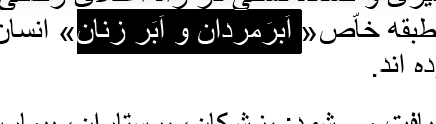
english font

english font correctly selects it.

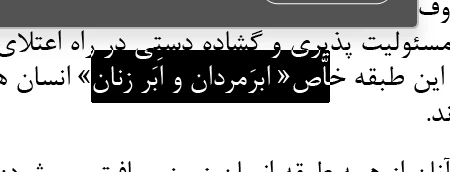
but farsi font does not.

farsi font


    Correct answer Joel Cherney

    > a certain group of farsi fonts do this while some do not. 


    I’m not really sure what you’re asking, but I have a hunch. InDesign changed the way it renders complex-script text recently (Harfbuzz text shaping was officially added in version 19), so I’m guessing that the fonts with Farsi support that are working for you were created more recently, and the ones that aren’t working for you are older. That’s just a guess, but if I’m right, try changing the Legacy Text Shaping setting in Preferences → Advanced Type and restarting InDesign. Or,, honestly, even if you can’t see an obvious Group of Old Fonts that are Broken and Group of New Fonts that Work, it might be useful to try switching text shaping anyways. 


    If that doesn’t resolve your issues, can you give us some more information? Can you tell us exactly which fonts are working and which are not, and exactly how you’re making your selection? 

    2 replies

    Ali-Sama
    Ali-SamaAuthor
    Known Participant
    April 13, 2026

    Omg. This solved all the issues . My last issue. Everything . You are wonderful and I appreciate you so much . Hugs.

    Ali-Sama
    Ali-SamaAuthor
    Known Participant
    April 13, 2026

    i think this is due to incompatiblity between fonts and indesign. a certain group of farsi fonts do this while some do not. 

    Joel Cherney
    Community Expert
    Joel CherneyCommunity ExpertCorrect answer
    Community Expert
    April 13, 2026

    > a certain group of farsi fonts do this while some do not. 


    I’m not really sure what you’re asking, but I have a hunch. InDesign changed the way it renders complex-script text recently (Harfbuzz text shaping was officially added in version 19), so I’m guessing that the fonts with Farsi support that are working for you were created more recently, and the ones that aren’t working for you are older. That’s just a guess, but if I’m right, try changing the Legacy Text Shaping setting in Preferences → Advanced Type and restarting InDesign. Or,, honestly, even if you can’t see an obvious Group of Old Fonts that are Broken and Group of New Fonts that Work, it might be useful to try switching text shaping anyways. 


    If that doesn’t resolve your issues, can you give us some more information? Can you tell us exactly which fonts are working and which are not, and exactly how you’re making your selection? 

    Ali-Sama
    Ali-SamaAuthor
    Known Participant
    April 13, 2026

    Thank you