Inspiring
December 27, 2022
Answered

the tool Align does not work on my Indesign 18.1

  • December 27, 2022
  • 1 reply
  • 7112 views

The tool Align does not work on my Indesign 18.1

I have tried several document, - but the Align tool does not work at all?

Can anybody help me?

Correct answer Barb Binder

The Align panel is working fine for me in v18. 


  1. Select the objects to align.
  2. Choose Window > Object & Layout > Align to display the Align panel. Note: To show or hide additional panel options, choose Show Options or Hide Options from the panel menu.
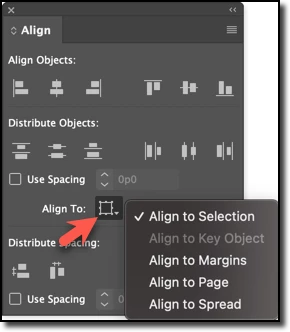
  3. From the Align to menu, specify whether you want to align objects based on the selection, margins, page, or spread.
  4. Then, click the button for the type of alignment you want. (Top row of the panel)


Step 3 is the one most people overlook and then tell us it doesn't work. 


~Barb

1 reply

Barb Binder
Community Expert
Barb BinderCommunity ExpertCorrect answer
Community Expert
December 27, 2022

The Align panel is working fine for me in v18. 


  1. Select the objects to align.
  2. Choose Window > Object & Layout > Align to display the Align panel. Note: To show or hide additional panel options, choose Show Options or Hide Options from the panel menu.
  3. From the Align to menu, specify whether you want to align objects based on the selection, margins, page, or spread.
  4. Then, click the button for the type of alignment you want. (Top row of the panel)


Step 3 is the one most people overlook and then tell us it doesn't work. 


~Barb

~Barb at Rocky Mountain Training
Participant
February 3, 2025

Thanks! You save my life!