

dublove
Legend
Nov 6, 2026 4:53 PM UTC
Answered

There are 2 problems about obtain paths need help.

Please help obtain the problem for both paths.
Question 1:  how did the version number I obtained from the path change to "Version% 2019.0-J"?

var bPath = app.scriptPreferences.scriptsFolder.parent.parent;
var Version = bPath.parent.name;
alert(Version);
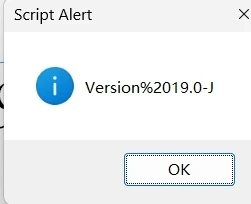
The space has become %20, which should be the "Version 19.0-J" in the path.


Question 2: How to obtain the location of ocalCaches in Windows?
C:\Users\ooloo\AppData\Local\Adobe\InDesign\Version 19.0-J\zh_CN\Caches
I wrote it like this, it doesn't seem right.

It's also good to be able to obtain a username.

var Version = bPath.parent.name;
var bPath = app.scriptPreferences.scriptsFolder.parent.parent;
//var localCaches = "%USERPROFILE%" + "\\AppData\\Local\\Adobe\\InDesign\\" + Version + "\\zh_CN\\Caches\\";

var localCaches =~"\\AppData\\Local\\Adobe\\InDesign\\" + Version + "\\zh_CN\\Caches\\";
alert(localCaches );


    Eugene TysonCorrect answer
    Community Expert
    Nov 6, 2026 6:29 PM UTC

    %20 is the URI-encoded representation of a space character. ExtendScript's File and Folder objects use URI notation for paths.

    You can decode the folder name using Folder.decode()

    var bPath = app.scriptPreferences.scriptsFolder.parent.parent;
    var version = Folder.decode(bPath.parent.name);

    alert(version);


    Use

    $.getenv("LOCALAPPDATA")

    should retrieve the user's Local AppData directory. 

    If I was to combine them

    // Get InDesign's version folder
    var bPath = app.scriptPreferences.scriptsFolder.parent.parent;
    var version = Folder.decode(bPath.parent.name);

    // Get Windows Local AppData location
    var localAppData = $.getenv("LOCALAPPDATA");

    // Construct the cache folder path
    var localCaches = new Folder(
    localAppData +
    "/Adobe/InDesign/" +
    version +
    "/zh_CN/Caches"
    );

    // Display the Windows path
    alert(localCaches.fsName);

    // Check whether the folder exists
    alert("Folder exists: " + localCaches.exists);

    Something like that.

    5 replies

    rob day
    Community Expert
    Community Expert
    Nov 6, 2026 8:25 PM UTC

    You might also look at the built-in cross platform Folder object, which has a number of short cuts to system folders. Makes it easy to get at parent and child folders:


    https://www.indesignjs.de/indesignapi/javascript/Folder.html


    Some examples:


    //Library Application Support Folder
    $.writeln("Library Application Support Folder: " + Folder.userData)

    //Application Support Folder’s Parent folder ~/Library
    $.writeln("Parent Library Folder: " + Folder.userData.parent)

    //User Scripts panel folder
    $.writeln("User Scripts Folder: " + Folder.userData.parent + "/Preferences/Adobe InDesign/Version 20.0/en_US/Scripts/Scripts Panel")

    //Scripts saved in the application folder
    $.writeln("InDesign Application Scripts Folder: " + Folder.appPackage.parent.fsName + "/Scripts/Scipts Panel" )

    //User InDesign Caches folder
    $.writeln("InDesign Caches: " + Folder.userData.parent + "/Cashes/Adobe InDesign/Version 20.0")

    //The name of the current file system.
    $.writeln(Folder.fs)


    Translate
    dublove
    dubloveAuthor
    Legend
    Nov 7, 2026 7:17 AM UTC

    Hi rob day.

    It seems like this has taught me before.
    Ah! My memory is not working.


    Translate
    Eugene TysonCommunity ExpertCorrect answer
    Community Expert
    Nov 6, 2026 6:29 PM UTC

    %20 is the URI-encoded representation of a space character. ExtendScript's File and Folder objects use URI notation for paths.

    You can decode the folder name using Folder.decode()

    var bPath = app.scriptPreferences.scriptsFolder.parent.parent;
    var version = Folder.decode(bPath.parent.name);

    alert(version);


    Use

    $.getenv("LOCALAPPDATA")

    should retrieve the user's Local AppData directory. 

    If I was to combine them

    // Get InDesign's version folder
    var bPath = app.scriptPreferences.scriptsFolder.parent.parent;
    var version = Folder.decode(bPath.parent.name);

    // Get Windows Local AppData location
    var localAppData = $.getenv("LOCALAPPDATA");

    // Construct the cache folder path
    var localCaches = new Folder(
    localAppData +
    "/Adobe/InDesign/" +
    version +
    "/zh_CN/Caches"
    );

    // Display the Windows path
    alert(localCaches.fsName);

    // Check whether the folder exists
    alert("Folder exists: " + localCaches.exists);

    Something like that.

    Translate
    dublove
    dubloveAuthor
    Legend
    Nov 7, 2026 7:22 AM UTC

    Hi Eugene Tyson.
    Thank you very much.
    I seem to have used decode (str) before. That's it.
    Alas, my brain is not functioning properly. It seems that I need to rest well.

    It seems like I don't necessarily need to get a username.
    This way, the AppSata can also be recognized.

    AppData = bPath.parent.parent.parent.parent.parent;


    Translate
    rob day
    Community Expert
    Community Expert
    Nov 7, 2026 1:26 PM UTC

    It seems like I don't necessarily need to get a username.


    Right, the path to any user’s library is:

    alert("\rPath to user’s library:\r" + Folder.userData.parent.fsName)


    Translate