

cbonargent
Participant
June 18, 2025
Answered

There seems to be a bug: fonts are not managed correctly in Indesign 2025

  • June 18, 2025
  • 2 replies
  • 430 views

Since the update, fonts are not managed correctly in Indesign 2025. Indesign doesn't recognize the fonts in my documents, and doesn't list the fonts that are already activated in Adobe fonts or elsewhere. The list that does exist is tiny with basic fonts.


Is there a way to reintialise the font manager ?


In the meantime I have to work in Indesign 2024 if I need to manipulate fonts!


Thanks for any help or feedback 🙂
Correct answer davecourtemanche

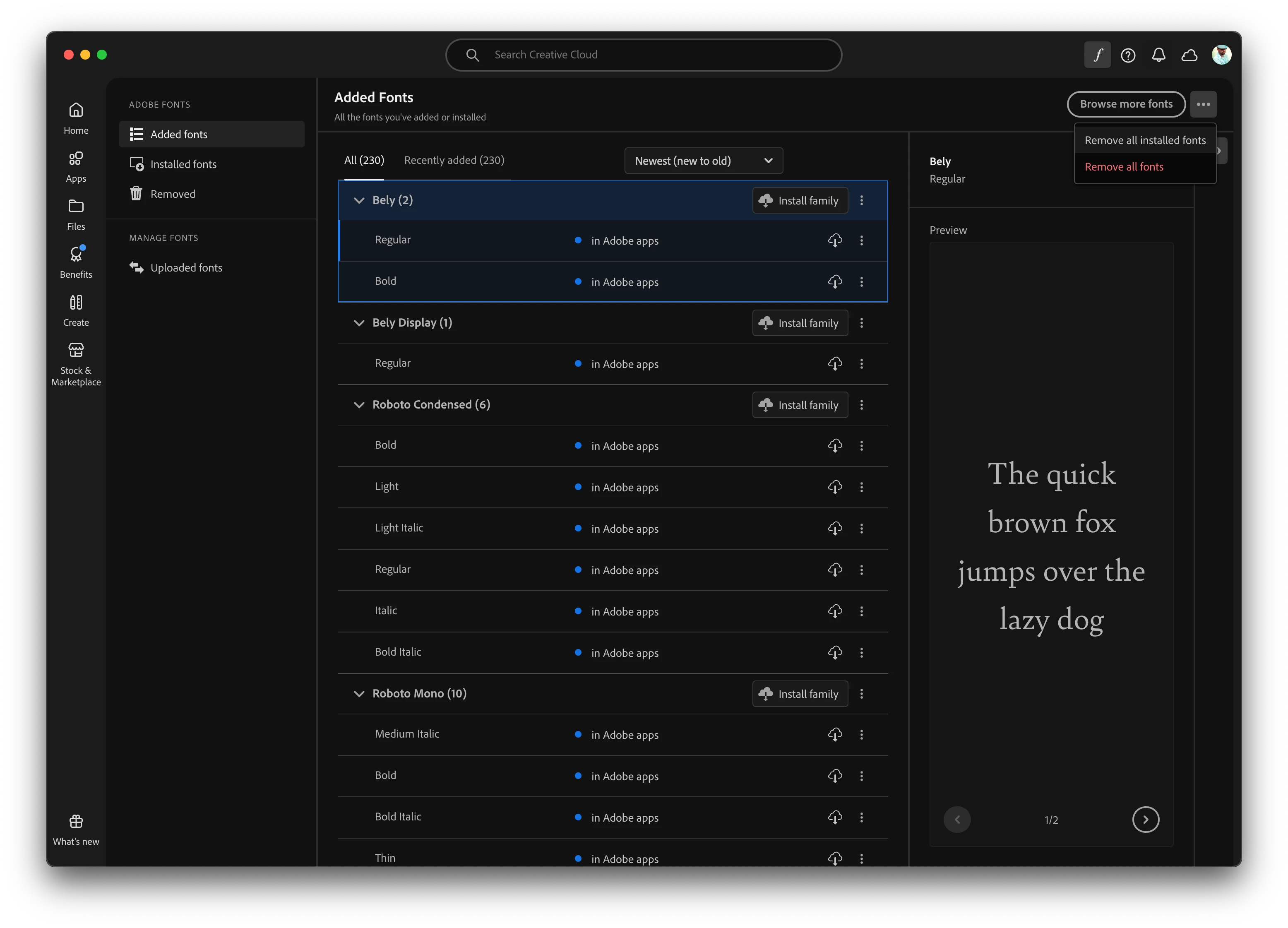
In the Creative Cloud app, Fonts section, off the 3 dots: Remove All Fonts. 
I run this from time to time to clear out bloat. 

2 replies

Abhishek Rao
Community Manager
Community Manager
June 23, 2025

Hi @cbonargent,


Glad to hear your fonts are showing up again. The button you mentioned sounds like it could be related to the 'Remove All Fonts' option in the Creative Cloud app's Fonts section, which is available via the three-dot menu(as mentioned by @davecourtemanche). That could explain why your font list refreshed properly afterward.

If the issue pops up again, it’s still worth trying the steps Anubhav shared earlier, especially cleaning and reinstalling the Creative Cloud components, just to rule out anything lingering in the background that might cause font syncing issues in InDesign 2025.


Do keep us posted if the issue comes back or if you notice anything else unusual. We're here to help!

Abhishek 

Anubhav M
Community Manager
Community Manager
June 18, 2025

Hello @cbonargent,

Would you mind trying the following steps and checking if it helps:


  • Close all Adobe applications
  • Remove the Creative Cloud Desktop application, CCLibrary, and CoreSync using the Creative Cloud Cleaner Tool (https://adobe.ly/3HGKGXN)
  • Reinstall the Creative Cloud Desktop application (https://adobe.ly/3G1AVTt)
  • Relaunch InDesign


Looking forward to hearing from you.

Anubhav

cbonargent
Participant
June 22, 2025

Hello Anubhav,


Thank you for the response. I admit that because of work I couldn't act and try your solution. 

But while working in Indesign, with the same problem happening again, I noticed in the Character tool a button "Delete all fonts" or something similar, and I clicked on it. Since then, I don't have the problem anymore!

My regular fonts have returned. Unfortunately however, I can't find that button anymore, it's not there. I wanted to post an image but I can't find the button. It was next to the button "Find more fonts".

Thanks again for your help!
Catherine

davecourtemanche
davecourtemancheCorrect answer
Inspiring
June 23, 2025

In the Creative Cloud app, Fonts section, off the 3 dots: Remove All Fonts. 
I run this from time to time to clear out bloat.