Participant
November 10, 2020
Question

Thin white outline around linked transparent CYMK PSDs in exported PDFs made in Indesign?

  • November 10, 2020
  • 2 replies
  • 340 views

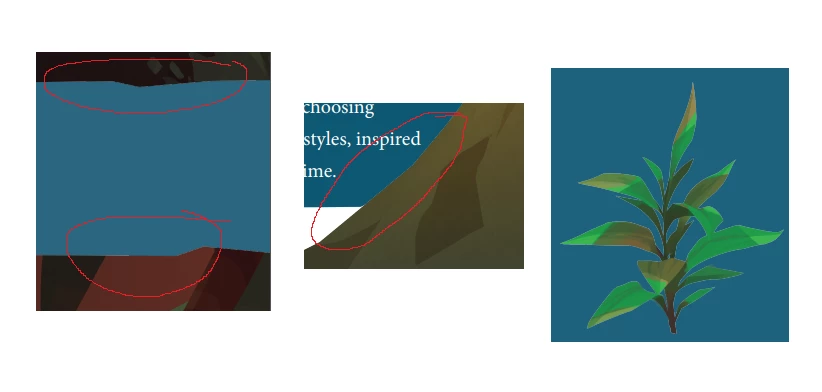
Hi, as you'll see in the image below there are very faint fuzzy outlines around these images I've placed into my Indesign file. These images are transparent PSDs and are CYMK. What can I do to remove these?


Thanks!
This topic has been closed for replies.

2 replies

Brad @ Roaring Mouse
Community Expert
Community Expert
November 10, 2020

What you are seeing is the anti-aliasing on the outer edges of your PSD file. It's particularly noticeable around areas of contrasting colour. e.g. by the brown stems. Especially so when working wth CMYK PSD files In your Photoshop file, since there's anti-aliasing happening, you get a little bit of fringe pixels that are "half" brown. Well when you place that, the "half" brown pixels "half" block out the background colour, creating a bit of a dip. Photoshop does have a Defringe tool to try and deal with these "halos" but it works only in RGB mode, but it's worth looking into.

Are you using a mask in the PSD file? You could try Sharpening the mask or even contracting it by a pixel or more so the edges aren't as aliased.

Mike Witherell
Community Expert
Community Expert
November 10, 2020

When you print, do you still see the white lines?

Mike Witherell
Mike Witherell
Community Expert
Community Expert
November 10, 2020

Sometimes you will see white lines onscreen, but they will not show when printed.

Mike Witherell
Mike Witherell
Community Expert
Community Expert
November 10, 2020

If only onscreen, go to Acrobat preferences > Page Display > and turn off enhance thin lines.

Mike Witherell