
Participant
December 2, 2025
質問

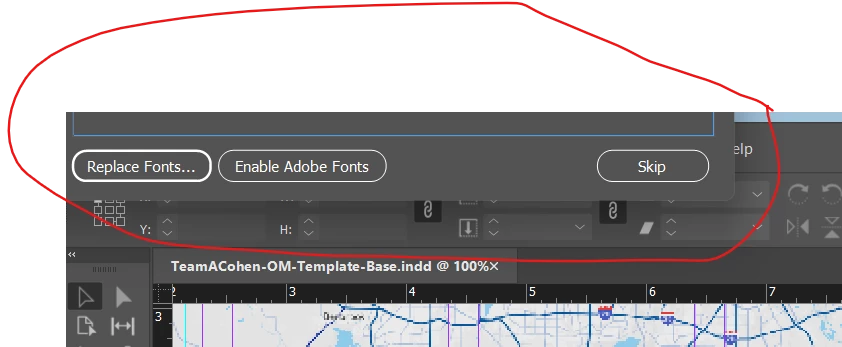
This item is off my screen on INDD and nothing I am doing to get it back is working, help!

  • December 2, 2025
  • 返信数 3.
  • 242 ビュー

I tried changing my display resolution, restarting my computer, reset my workspace on INDD, unplugged my laptop from my monitors (which usually works, but didn't this time), and I still cant get this to not be off my screen. And I can't drag it. Any otherdesktop.png suggestions?
返信数 3

Willi Adelberger
Community Expert
Community Expert
December 2, 2025

 Can you select it with the proxy square in the layer panel? If so, select it. Cut it into the clipboard and paste it. It should now be found in zhe center of the screen. 

BobLevine
Community Expert
Community Expert
December 2, 2025

It's not the document, it's the find fonts panel.

BobLevine
Community Expert
Community Expert
December 2, 2025

Do you have the application frame enabled?

Mike Witherell
Community Expert
Community Expert
December 2, 2025

Did patching to 21.0.2 help or change anything?

Mike Witherell