

Question
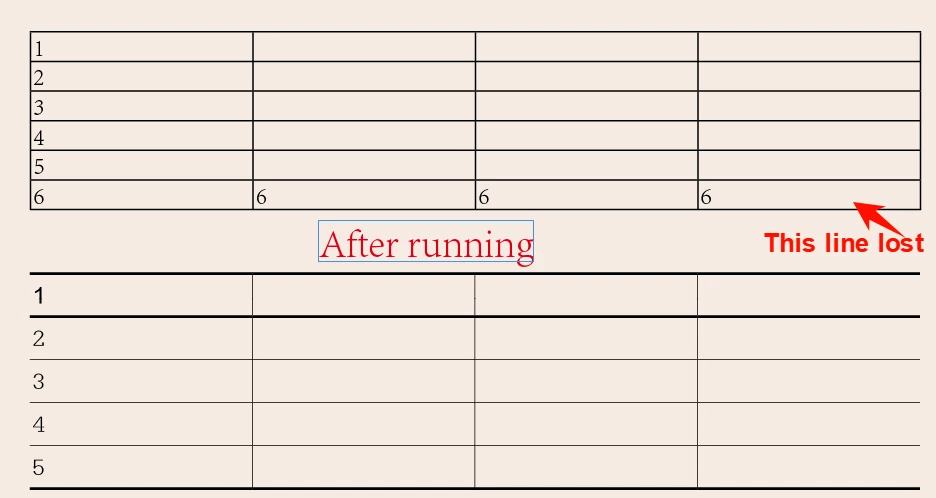
This Script is use to convert first row to header, the last row to footer, it delete my content.
This Script is use to convert first row to header, the last row to footer, it delete my content.
Sorry, The original post seemed to be posted by me. But for too long, I didn't find it.
The initial purpose:
It will judge the last row of the table.
If it is empty, it is directly converted to the footer;if it is not empyt(have content), add 1 row Below the last row, and convert the new row to footer.
It also convert first row to header, apply the cellstyle.
But now it delete the last row, that it is Non -empty line. my content lost.
table = app.selection[0];
app.selection[0].appliedTableStyle = "mytab";
var myHeaderRow = table.rows[0];
var myNextRow = table.rows[-2];
var myFooterRow = table.rows[-1];

for (var i = 0; i < table.rows.length - 1; i++) {
  table.rows[i].cells.everyItem().minimumHeight = "7.6mm";
};


// Optional:
myFooterRow.cells.everyItem().contents = "";
// Not optional.
// Set the point size in a value, so that the text could be visible despite the minimal height of the cells:
myFooterRow.cells.everyItem().texts.everyItem().pointSize = 0.1;
myFooterRow.cells.everyItem().appliedCellStyle = "footer";
myHeaderRow.cells.everyItem().appliedCellStyle = "header";
myFooterRow.cells.everyItem().topInset = 0;
myFooterRow.cells.everyItem().leftInset = 0;
myFooterRow.cells.everyItem().bottomInset = 0;
myFooterRow.cells.everyItem().rightInset = 0;

myFooterRow.cells.everyItem().height = "1.06mm";//行高
//myNextRow.cells.everyItem().minimumHeight  = "7.5mm";


if (!(table.rows[0].rowType == RowTypes.HEADER_ROW)) {
  table.rows[0].rowType = RowTypes.HEADER_ROW;
}
else {
  //alert("header existed");
};
if (!(myFooterRow.rows.item(-1).rowType == RowTypes.FOOTER_ROW)) {
  myFooterRow.rows.item(-1).rowType = RowTypes.FOOTER_ROW;
}
else {
  //alert("end of the table exists");
};


 AdChoices