
Participant
June 5, 2024
Answered

Thread text between columns not working

  • June 5, 2024
  • 2 replies
  • 307 views

Hi!  During a class I was teaching today on InDesign, I went to show how to thread text from one column to another.  However when I clicked on the out port, I received the below box instead of the text in the cursor!
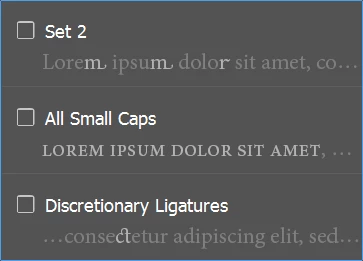
I then tried to find via a right click another option to do a thread, but was unsuccessful.  I really hope this is a bug!  I have not changed my settings, so I have no idea how this happened.


Is there a way to change it back to doing a thread or is there another way to thread text.  Any help is greatly appreciated!


Lynn

This topic has been closed for replies.
Correct answer Mike Witherell

Preferences > Advanced Type > Type Contextual Controls > turn off those two unhelpful features!

Maybe you can find the outport after that.

2 replies

Mike Witherell
Community Expert
Community Expert
June 5, 2024

These features have been in many versions of InDesign (introduced in late 2016, IIRC). 

They are nifty features added as frame adornment icons, but the reality is that I don't need them that often. When I do, I have them bottled up in a paragraph style, or else I reach for the Glyphs panel.

Mike Witherell
Mike Witherell
Community Expert
Mike WitherellCommunity ExpertCorrect answer
Community Expert
June 5, 2024

Preferences > Advanced Type > Type Contextual Controls > turn off those two unhelpful features!

Maybe you can find the outport after that.

Mike Witherell
Participant
June 5, 2024

YAY!!!  Thank you so much.  It worked.  Is this something I need to check after an InDesign update?  I know I didn't check those items before.


Again, thank you so, so much!


Lynn