
diethere82
Participant
March 2, 2019
Question

Tibetan fonts in Indesign CC2019?

  • March 2, 2019
  • 9 replies
  • 10844 views

hello all,

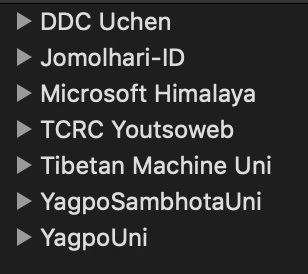
since there seem to be no activity in this old thread, i'll start a new one, concerning Tibetan fonts in Indesign CC2019. wrongly stacked characters, missing letters by showing squares; with World-Ready-Composer on, these problems still occurs. i'm copy + pasting from a PDF (where it shows correctly stacked and complete Tibetan text without a problem). working on a MacBook Pro, macOS Mojave, version 10.14, all of these fonts are not working correctly:
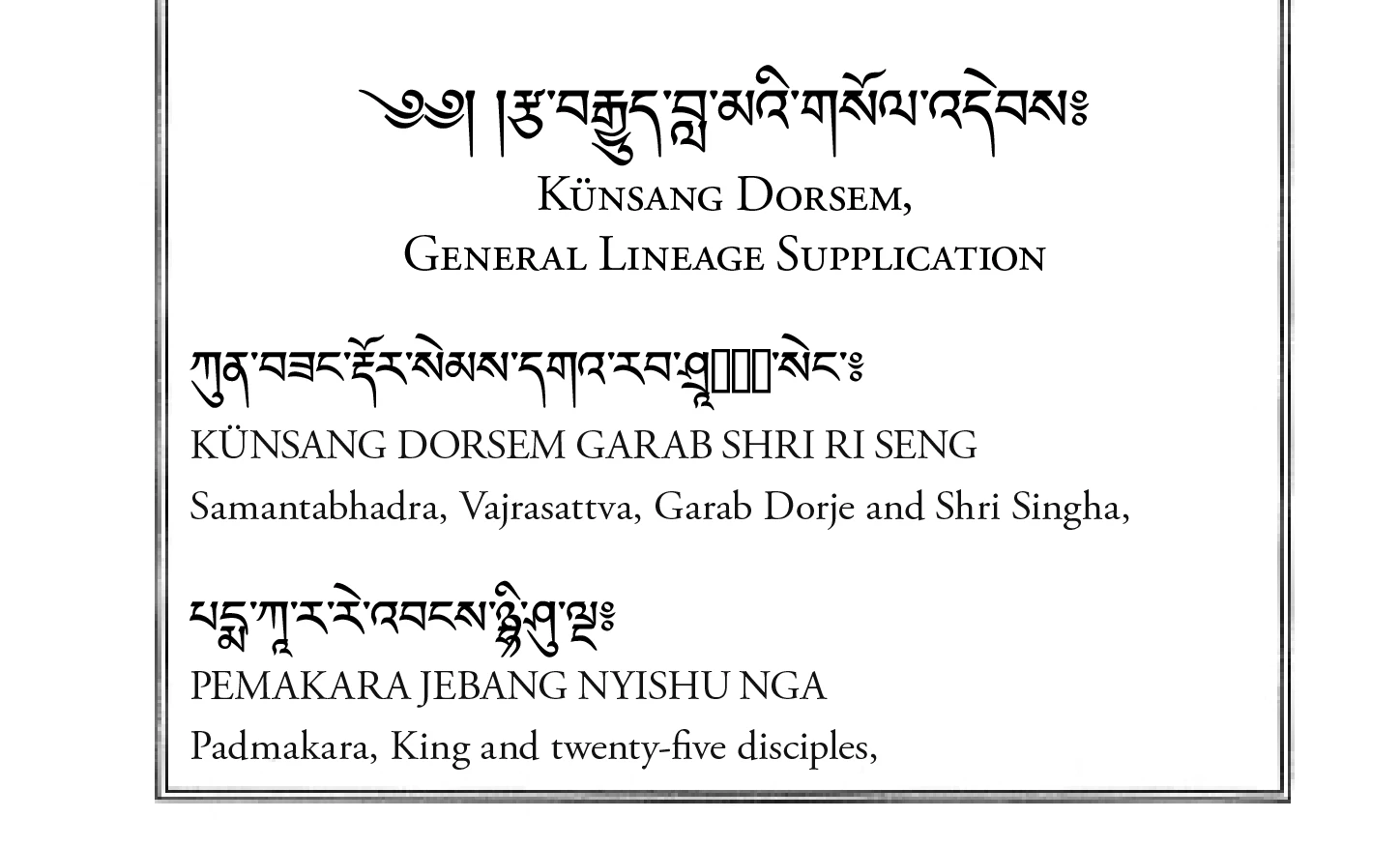
i tried all kind of work-arounds, like installing older versions of Indesign 2014, installing Hebrew or Arabic versions of InDesign CC, etc. no result unfortunately.

am i the only one? i find it hard to believe a huge market leader like Adobe don't seem to arrange a way to set Tibetan fonts... i really hope someone can support in this problem.

kind regards,

Jampa Tsomo

This topic has been closed for replies.

9 replies

Participant
February 5, 2024

JOMOLHARI from google font will work for Indesign (in windows). I tried a lot of fonts but this one worked. 

carlairusta
Participant
September 30, 2020

Hi!

 I'm having the same problem...
even changing the composer to World-composer the stacks are not shown correctly. In Pages and Notes no problem, but in Adobe CC it doesn't work. It's unbelievable ... I've tried everything and wasted so much time. Please someone help.

Participant
September 30, 2020

Heya. I managed to find a solution to the issue I was having but I can't remember what exactly I did. It was from a search I did on Sanskrit font issues and I think the post I found was based on an Indian font. Apologies, I can't find it now. I've posted screenshots of my settings though if that helps. The font I am using is Noto Serif Tibetan from Google Fonts.


Participating Frequently
July 30, 2021

Looking at this old thread seeking solutions and bumping in case anyone did finally find one. Really spending a lot of time on this myself

Participant
April 27, 2020

Heya. I'm also having this issue, it could be great if someone could provide an answer! 

I did find a few fonts that worked from here: http://www.yalasoo.com/English/docs/yalasoo_en_qomolangma_fonts.html but everything else seems to mess up.


Andrew37
Participant
June 16, 2020

I have been typing directly into Indesign for years without probelms. I always turn the World-Ready Composer on in the Paragraph Style which is on the Justification Panel. I use mainly Tibetan Machine Uni but have many of the other mentioned fonts and I find they work. However, I tried the transliterated Sanskrit in the original post in the is thread, the Shri syllable and it won't create the stack in Indesign CC on my Mac. These used to work in CS6. Adobe has changed something. 


I have another probelm. Last year Apple upgraded the OS from 32 bit to 64 bit and my then Indesign CS6 quit functioning. I have switched over to CC. The trouble I'm having is with micro adjustments. In CS6 I could choose a single character in any stack, like the vowels. Sometimes they don't appear placed perfectly and I like to select them and adjust using kerning, tracking, leading etc.. Indesign CC won't allow me to select those individually any longer. If I place the cursor next to a stack and press an arrow key leading into the stack the cursor moves to the other side of the stack completely. Indesign CS6 it used to kind of hover over the letter until I pressed the arrow key enough times to move past each element. 

རྒྱུ་ This stack is four elements, ra/ga/ya and the vowel U. 

Does anyone know how to select any of those elements individually in Indesign CC? 

Participant
January 28, 2020

Go to InDesign menu > Preferences > Advanced Type > and in the menu under Default Composer, select "Adobe World-Ready Paragraph Composer" or "Adobe World-Ready Single Line Composer" 


I noticed this doesn't work with OTF fonts, but it does work with TT fonts.  
I was having a really hard time getting Jomolhari to work, but this did it! 


Participant
November 2, 2019

I'm having the same issue. Tibetan unicode fonts that work fine in TextEdit, and that used to work fine in an old version of InDesign no longer work properly. (I'm on a Mac.) I need to update an old document that included large blocks of Jomolhari-ID, and now the line ends have black squares that I can't remove, some lines don't wrap, and a few stacks mess up. When I replace it with a different font (BabelStone or Monlam Ouchan), text-wrap works, but even more common stacks (such as sku, rgya and grwa) mess up. If I paste from InDesign into TextEdit, the stacks are fine, but then paste them back or retype them directly in InDesign and it's a mess. Please somebody help us!

Participant
December 17, 2019

The only font that I've been able to get to work is LTibetan

Participant
December 18, 2019

I love LTibetan and used it for decades, but the 5-year-old document I have to update was typed in a Unicode font, and LTibetan is not Unicode. It would be difficult to retype the document in LTibetan now because the lovely old WylieEdit of the 1990s no longer works so I'd have to use copy paste from an old document to get certain stacks. (I'm a whiz at typing in legacy LTibetan, but only for updating isolated words in my Ladakhi dictionary document, not for typing 9 pages of text!) 

Or do you mean there is now a Unicode version of LTibetan? If so, where can I get it?  

Participant
October 7, 2019

Another Tibetan font that doesn't work is Kailasa (standard on the Mac), and it is nothing to do with pasting from a PDF. If I create a text object, and type in the Tibetan, or even paste in the Tibetan from a txt file, the stacking vowels don't work. Is there any simple solution? The links provided by the Adobe Employee are interesting, but ultimately not useful  - one is for Photoshop elements, and the other is for wanting to work the entire time in another language, which is not the case. I simply want to have an English UI, that allows me to type or paste Tibetan characters. I'd love a solution. Thanks.

Srishti Bali
Community Manager
Community Manager
March 5, 2019

Hi Diether,

Sorry to hear about this issue. In addition to the suggestions shared above, you can also refer to these helps articles:

Work with Asian type

Adobe InDesign Tips: Japanese/CJK Functionality + English UI

Regards,

Srishti

Marvest
Inspiring
March 2, 2019

If I were doing this project I would convert the PDF to Word first. I don't think copy/pasting from PDF to Indesign will work. Give it a try and let us know if it works.

Participant
July 1, 2024

It was a good idea but unfortunately it did not work. 😞


Michael Bullo
Community Expert
Community Expert
March 2, 2019

This is a long shot. If I'm having problems copying and pasting with two programs that support advanced forms of formatting I will introduce an intermediate step involving either Notepad on Windows or TextEdit (in plain text mode) on a Mac. I will first copy and paste into the simple text editor. I will then select and copy everything before pasting into my final program. It sometimes helps. Good luck.