
Known Participant
June 1, 2021
Answered

TOC in Book not Working

  • June 1, 2021
  • 11 replies
  • 3720 views

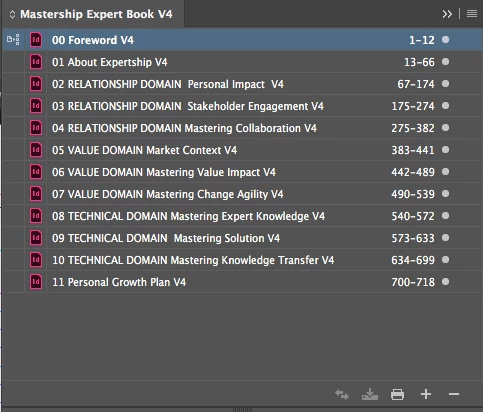
I'm working on a document that's 750 pages long. I've created 12 individual documents in relevant sections and synchronized them within a book. I'm now desperately trying to create the TOC as it has to be an interactive PDF but it's not working at all I only get the heading when I run the TOC. This doc also has 3 TOC plus an index, I've tried the following;

  1. I've synchronized TOC and Para style within the book
  2. Saved docs and book, every time I do a change
  3. I've replaced all the style sheets that are used to create the TOC (8 styles), just in case I messed up my naming convention.
  4. I've all the docs open when I run the TOC
  5. I've tested each doc separately by using the same TOC Style and deselecting Include Book Documents and it works in the individual docs
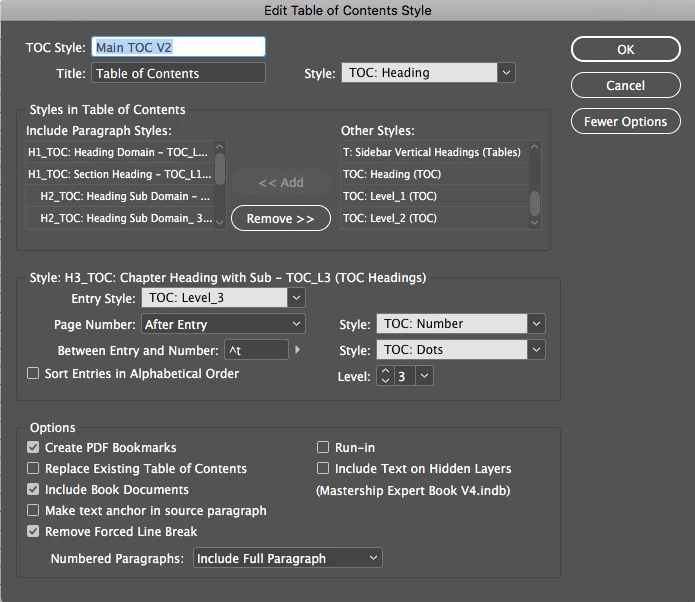
  6. Below is a screenshot of the TOC Style just in case I've missed anything.


Any help would be greatly appreciated as I can't work out what's happening and I'm now on deadline.
 

This topic has been closed for replies.
Correct answer Laubender

Hi Jodi,

so I take from your reply that all of the TOCs are working now as expected.

Good to know, that the issue could have been a bug with the very first version of InDesign 2020.


Regards,
Uwe Laubender

( ACP )

11 replies

Lukas Engqvist
Community Expert
Community Expert
June 1, 2021

Knowing how Mac works I would not advise  ":" as part of a Character or Paragraph style name, on mac this is normallly part of path for marking folders. It's no fun to change the name when you are so fart into the project. Do you have another computer, say a PC you could try to generate the TOC on?


Known Participant
June 1, 2021

I always name my style sheets like that and never had an issue BUT I've never had a doc this big and I've had server issue, I don't have a PC but I will update them and give it a try. I will let you know if it works. Thank you